EKS audit logs only land in CloudWatch Logs in their own account. Once there are many accounts and clusters, there is no single place that shows what happened across all of them. This post covers how we store them in one account, structure them with Vector and write them to MSK, so downstream teams subscribe from MSK for alerting and analysis. It also compares Firehose and KDS for the transport in between.
The problem
- Each cluster has its own log group (
/aws/eks/<cluster>/cluster), with audit events in streams that start withkube-apiserver-audit, spread across accounts and Regions with no single entry point - Answering "who touched this namespace last week" means opening Logs Insights account by account and stitching the timeline together by hand
- Security problems go unnoticed. Someone runs
kubectl execinto a container in Prod, edits a ConfigMap or starts a privileged container; the log has it, but it is scattered and nobody is looking - Downstream teams that want to consume the logs (alerting, analysis, troubleshooting) either integrate with every account separately, or can't do it at all
So the goal is: keep one copy of the logs, with every account and cluster in the same place, and let each downstream team consume what it needs without affecting the others.
Design constraints
The usual first idea is "install an agent in every account and ship everything". That doesn't work when there are many accounts:
- One agent per account means managing that many versions, configs and upgrades. Worse, the agent becomes a new failure source: if one account's agent dies, hits OOM or drifts in version, we may not know, and the audit trail depends on exactly that. So no process that needs maintenance runs in the source accounts; AWS managed services push the data instead
- If the central account pulls, it needs connectivity to the VPC of every account, with route tables, security groups and CIDR conflicts, redone for every new account. So cross-account access uses IAM only, and data travels through AWS-internal channels
- EKS is managed, and we can't reach the control plane nodes. CloudWatch Logs is the only place audit logs come out, and the audit policy is fixed by AWS. That makes CloudWatch Logs the first hop
The result is zero deployment and zero network change in the source accounts. Onboarding a new account is one Subscription Filter.
Architecture
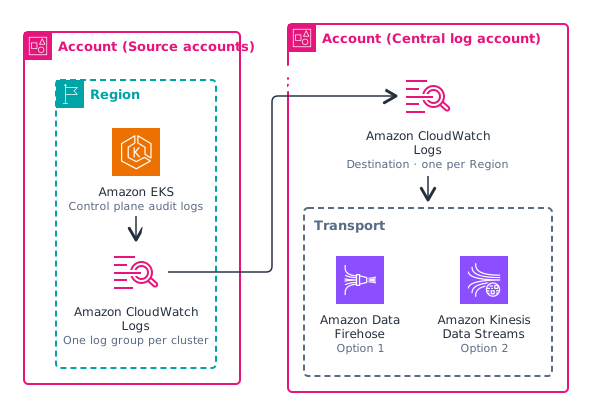
- Source account: EKS audit logging is enabled, logs go to CloudWatch Logs, and a Subscription Filter pushes them to the central account
- Central account: a CloudWatch Logs Destination receives them and hands them to Firehose (option 1) or KDS (option 2). We chose Firehose
- Cross-account authorization is two IAM settings: a Destination Policy on the Destination lists the accounts allowed to call
PutSubscriptionFilter; the role bound to the Destination trusts thelogsservice and is restricted to those accounts withaws:SourceArn - A Destination must be in the same Region as the log group that subscribes to it, so there is one per Region. The Firehose and S3 behind it don't need to be per Region; they can sit in a single Region, which does the cross-Region aggregation
Central store and Vector
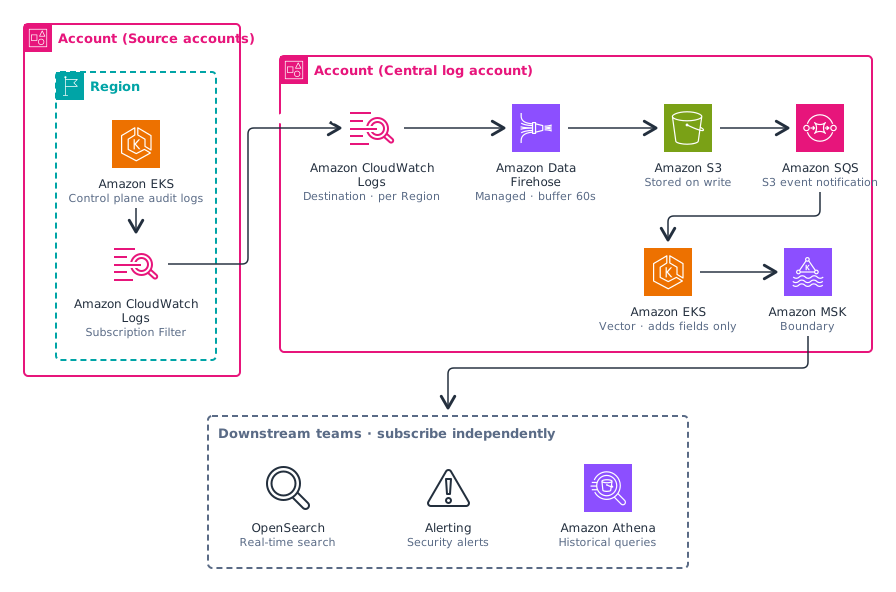
The full path is S3 → SQS → Vector → MSK → downstream:
- Firehose writes a GZIP object to the central S3 bucket every 5MB or 60 seconds, so logs from every account and Region are in one bucket. S3 is the final store, and the original data stays there
- Each new S3 object sends an SQS notification. The queue doesn't hold logs; it holds S3 Event Notifications (1–2KB each, just saying which key has a new object), and Vector then calls
GetObject. SQS is used because it brings retries and load smoothing, and several Vector replicas can consume the same queue in parallel - Vector runs on EKS, stateless, with 2 replicas. It does the ETL: decompress gzip, parse JSON, unpack CloudWatch's batched
logEventsinto single audit events, add metadata, and write to MSK - Vector only adds, it never rewrites. New fields go in a separate namespace, and the original audit event is kept byte for byte, with no field removed and no value changed
The added metadata comes in three groups:
- Cluster context: account, cluster, Region, environment. The batch itself carries the account ID, log group and log stream, so the origin is reliable
- Runtime security: whether it is
run_as_rootorprivileged, determined from the Pod spec - Operation metadata: the actor, the verb, read or write, and
operation_type(manual or automated)
operation_type is the most important field; whether "alert on manual changes" works depends on it. System service accounts and controllers count as automated, and a person coming through a bastion or proxy counts as manual.
The actor isn't in the same field everywhere: with direct IAM access, look at user.extra.sessionName; through a proxy, user holds the proxy's own role and the real actor is in impersonatedUser. If you only read user.username, every proxied operation is attributed to the same account, and "who ran this delete" can never be answered.
MSK is where this design stops. From there each team subscribes independently and manages its own offset, so they don't affect each other; adding a consumer later is just one more consumer group, with no change upstream. We use MSK rather than self-managed Kafka so that broker patching, cross-AZ failover and storage scaling are handled by AWS; an audit pipeline shouldn't depend on a cluster we run ourselves.
That makes the downstream use cases straightforward:
- Security team: detect manual
exec, privileged containers,secretsreads and RBAC changes in Prod, and alert on a hit - DevOps team: look up in OpenSearch who changed a resource and when, and rule out "did someone change it" first when a service breaks
- Cross-account statistics and analysis: queries that used to need regexes become equality filters, for example "all manual deletes in Prod over the past week" is three conditions:
env,verbandoperation_type
Filter at the source
Every downstream hop is billed and scaled by volume, and noise in the store buries the events that matter, so it is removed at the source. The Subscription Filter keeps only the ResponseComplete stage and excludes health-check and metrics requests (healthz, readyz, livez, metrics, version, swagger).
An audit event has four stages: RequestReceived, ResponseStarted, ResponseComplete and Panic, and one request produces several of them. Only ResponseComplete carries the result, the authorization decision and the full request/response objects, so it is the only one that can answer "who did what, and did it succeed" on its own.
For 10 TB/month of raw data as an example (illustrative numbers): keeping only ResponseComplete leaves about 5 TB, removing health checks and system endpoints leaves about 2.8 TB, and removing high-frequency automated list/watch (kube-proxy, controllers) leaves about 1 TB.
Note: the filter takes effect after CloudWatch. It saves downstream transport and storage, not the CloudWatch ingestion fee. Panic is filtered out too; it is a separate monitoring signal and needs its own ingestion if wanted.
Comparison: Firehose or KDS
Both options share the first half (same filter, same cross-account Destination). They differ only after the central account.
- Option 1: Destination → Firehose → S3. A new S3 object sends an SQS notification, and consumers fetch objects from it
- Option 2: Destination → KDS, consumed directly as a stream
| Dimension | Option 1: Firehose → S3 | Option 2: KDS |
|---|---|---|
| End-to-end latency | about 2–10 min | about 1–5 min |
| Hops | 5 (Destination, Firehose, S3, SQS, Vector) | 3 (Destination, KDS, Vector) |
| Storage | stored as soon as written; S3 is the final store | not persisted; storing needs a separate path to S3 |
| Replay | not supported; you rescan S3 with your own script | can re-consume from a point in time |
| Catch-up window after consumer downtime | no upper limit (data is in S3; SQS notifications kept 14 days, rescan by prefix after that) | equals KDS retention, 24 h by default, longer costs extra |
| Multiple consumers | one Firehose destination; teams subscribe from MSK after Vector | KDS itself allows several consumers to read in parallel |
| Operations | fully managed | On-Demand needs none; Provisioned means managing shards |
- Latency: the shared part is EKS writing to CloudWatch Logs. The docs only say "within a few minutes", best-effort and no SLA, roughly 1–5 minutes, and we can't control it. That is the main bottleneck. Option 1 adds the Firehose buffer (60–300 s, configurable) and the SQS pull (0–15 s). These are estimates from the documentation, not measurements
- Hops: counter-intuitively, option 2 is simpler. Two fewer components means two fewer failure points
- Catch-up window: this is the real difference between the two. In option 2, if a consumer is down longer than the retention period, that data is gone for good, with no fallback layer. In option 1 the data in S3 is final, so a consumer can be down for days or weeks and still catch up
- Replay: I think this is the most valuable thing about option 2. When downstream logic changes or has a bug, it can save you. But its window is limited, which is why it offsets option 1's "the data is permanently on disk"
- Cost: the difference is small. Ingestion is most of the bill and is the same for both, so cost isn't what decides it
We chose Firehose. For the goal of "one central store that several teams consume independently", being stored on write, consumers that scale on their own, and no time limit on catching up after downstream failures matter more than a few minutes of latency. If measured latency isn't good enough, or replay turns out to be needed, switching to option 2 only replaces the middle hop: the filter and the Destination stay as they are, and so do Vector's transforms; only the source changes (S3 + SQS to KDS).
Onboarding a new account
This is where most of the operational traps are. A new account needs all three of the following, and if any one is missing, logs don't arrive, with no error and no alert:
- The account ID is in the Destination Policy allowlist (and in the role's
aws:SourceArn) - The target Region already has a Destination
- The Subscription Filter is configured in the source account
The allowlist and all three steps should be managed by Terraform. Then onboarding an account is: add the ID to the allowlist, apply on the central side, apply on the source side to roll out the filter.
Remaining problems
- The delay from EKS to CloudWatch Logs has no SLA, and we can't control it
- A missing account in the allowlist raises no alert. For now we rely on IaC to not miss one
- If Firehose's output format changes, decompression and parsing downstream fail silently, so parse errors need an alert
- CloudWatch Logs ingestion is most of the cost, and the audit policy of managed EKS can't be changed, so volume can't be reduced at the source. All we can do is enable only the
auditandauthenticatorcontrol plane log types and turn off api, controllerManager and scheduler