2026-11-03 · AI · AWS
AgentCore Payments × x402 × Privy: Running It Locally
This post shows how to let an AI agent pay automatically when it hits a paid API. The server returns 402, the agent signs with a Privy wallet managed by AgentCore Payments, retries with the signature, and gets the content. The chain is the Base Sepolia testnet and the coin is test USDC.
All code runs locally. AWS only needs two IAM roles and a few AgentCore Payments resources. The full code is in domechn/agentcore-x402-payment-demo; this post only shows the key parts.
Components
- x402: a payment protocol built on HTTP 402. It defines the
PAYMENT-REQUIREDandPAYMENT-SIGNATUREheaders seller.py: the seller./premiumcosts 0.001 USDC, local:4021agent.py: a Strands agent plusAgentCorePaymentsPlugin. 402 → pay → retry is automatic; it opens no port- Privy frontend: Privy's official Next.js app for login, authorizing the agent and funding the wallet. Local
:3000, only needed during setup - Bedrock: serves Claude Sonnet 5, us-west-2
- AgentCore Payments: enforces the session budget and calls the wallet to sign, us-west-2
- AgentCore Identity: stores the Privy credentials (Secrets Manager underneath), us-west-2
- Privy: holds the embedded wallet's private key and signs on its behalf
- x402.org facilitator: verifies the signature for the seller, submits the on-chain transaction and pays gas
- Base Sepolia: the chain where the USDC transfer lands,
eip155:84532
What happens in one payment
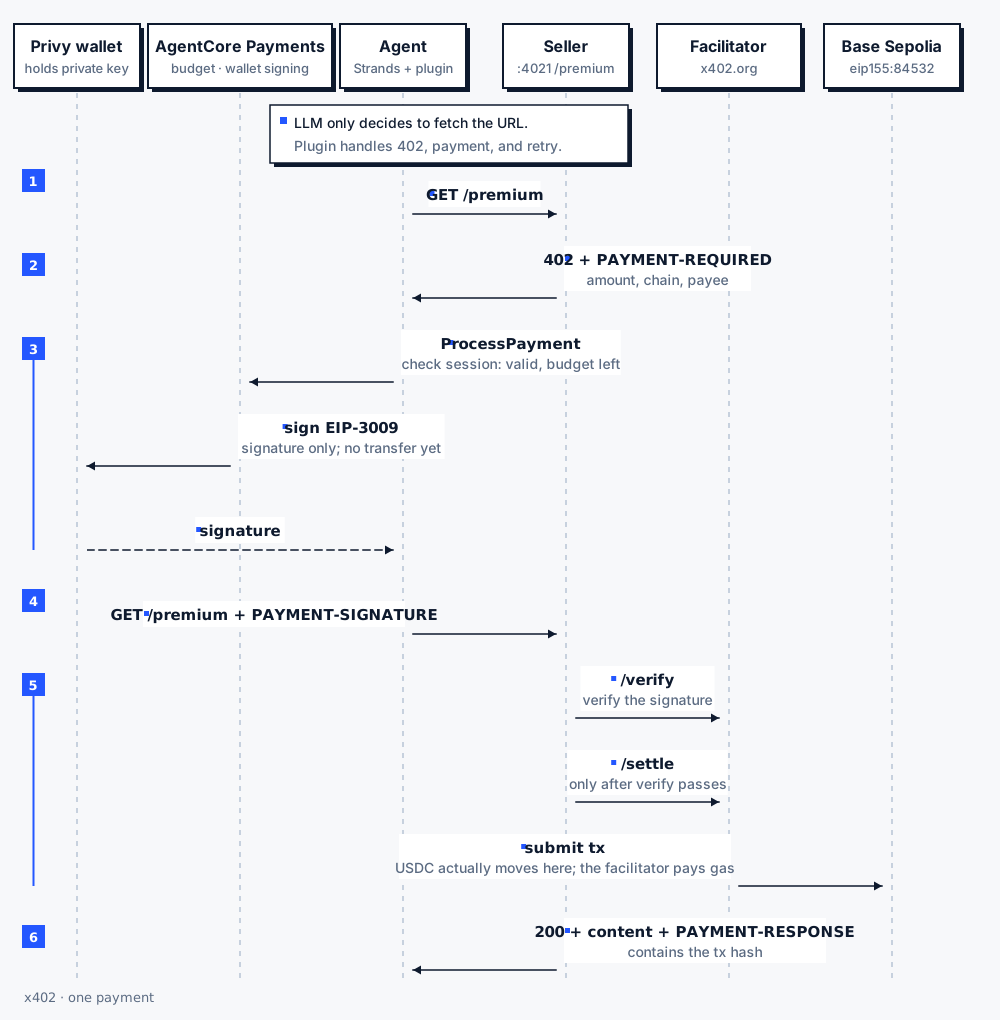
- The agent sends
GET /premium - The seller returns
402withPAYMENT-REQUIRED(base64 JSON: how much, which chain, pay to whom) - The plugin calls
ProcessPaymenton AgentCore Payments. It checks that the session has not expired and the budget is enough, reads the Privy credentials withPaymentsServiceRole, and has Privy sign an EIP-3009 authorization with the wallet. Nothing has been transferred yet - The agent sends
GET /premiumagain withPAYMENT-SIGNATURE - The seller passes the signature to the facilitator's
/verify, then calls/settleto put it on chain - The seller returns
200, the content andPAYMENT-RESPONSE(which contains the transaction hash)
The LLM only decides to "fetch this URL". Recognizing the 402, paying and retrying are done by the plugin, so the model never touches the money.
Who holds what
- Wallet private key: held by Privy, not by your machine or AWS
- Privy credentials: stored in AgentCore Identity, readable only by
PaymentsServiceRole - Agent permissions:
AgentRoleonly hasProcessPaymentand read access. It cannot create a session to give itself more budget - What is signed: the payee and amount are fixed in the signature, so the facilitator can only submit it as is. The seller verifies against its own requirement, so the buyer cannot pay less
Prerequisites
- AWS: an admin profile that can use CloudFormation, IAM and
bedrock-agentcore, regionus-west-2 - Bedrock: model access to Claude Sonnet 5 enabled in us-west-2 (
us.anthropic.claude-sonnet-5) - Local: Python 3.10+, Node 22+ and
pnpm(for the Privy frontend) - Privy: create a dedicated app
In the Privy Dashboard:
- Settings → API keys: get the App ID and App secret
- Wallet infrastructure → Authorization → New key: the Key ID is
PRIVY_AUTHORIZATION_ID, the Private key isPRIVY_AUTHORIZATION_PRIVATE_KEY. The private key is shown only once, when you create it, in the formwallet-auth:... - App Settings → Basics → Domains: add
http://localhost:3000
The Privy option does not need an AWS Marketplace subscription. Only the Coinbase option does.
Files in the repo:
infra/infra.yaml: CloudFormation, 2 IAM rolessrc/setup_payments.py: one-time setup, output goes topayments.json(IDs of the manager, wallet and session)src/seller.py: the seller (x402 v2),:4021src/agent.py: the buyer agent.envandpayments.jsonare in.gitignore. Run every command from the project root
.env (the repo has an .env.example):
PRIVY_APP_ID=...
PRIVY_APP_SECRET=...
PRIVY_AUTHORIZATION_ID=...
PRIVY_AUTHORIZATION_PRIVATE_KEY=...   # with or without the wallet-auth: prefix
WALLET_EMAIL=you@example.com          # the email you log in with on the Privy frontend
SELLER_ADDRESS=0x...                  # seller's payee address: any EVM address of yours, not the agent's wallet
Steps
1. Deploy IAM
export AWS_REGION=us-west-2 AWS_PROFILE=<admin-profile>
aws cloudformation deploy --stack-name agentcore-x402-payment-demo --template-file infra/infra.yaml --capabilities CAPABILITY_IAM
infra.yaml defines two roles:
PaymentsServiceRole: trustsbedrock-agentcore.amazonaws.com, restricted byaws:SourceAccountandaws:SourceArn(payment-manager/*). Its permissions come in four groups: creating, deleting and getting tokens for workload identities;GetResourcePaymentToken(token-vault/*); creating and reading payment credential providers; and reading the secrets namedbedrock-agentcore-identity!*in Secrets ManagerAgentRole: trusts this account. Its permissions are invoking Bedrock models plusProcessPayment,GetPaymentInstrument,ListPaymentInstruments,GetPaymentInstrumentBalanceandGetPaymentSession, scoped topayment-manager/*. It cannot create sessions or wallets
2. Set up Payments
python3 -m venv .venv && .venv/bin/pip install -r requirements.txt
.venv/bin/python src/setup_payments.py
src/setup_payments.py runs in five steps. Each finished step is saved to payments.json, so a rerun skips what is done:
ctrl = boto3.client("bedrock-agentcore-control", region_name=REGION)  # control plane
dp   = boto3.client("bedrock-agentcore",         region_name=REGION)  # data plane

# 1. Store the credentials in AgentCore Identity
cp = ctrl.create_payment_credential_provider(
    name="agentcore-payment-x402-demo-privy", credentialProviderVendor="StripePrivy",
    providerConfigurationInput={"stripePrivyConfiguration": {
        "appId": os.environ["PRIVY_APP_ID"],
        "appSecret": os.environ["PRIVY_APP_SECRET"],
        "authorizationId": os.environ["PRIVY_AUTHORIZATION_ID"],
        "authorizationPrivateKey": os.environ["PRIVY_AUTHORIZATION_PRIVATE_KEY"].removeprefix("wallet-auth:"),
    }})

# 2. Payment Manager (letters and digits only in the name); wait until READY
m = ctrl.create_payment_manager(name="x402demo", authorizerType="AWS_IAM",
                                roleArn=outputs["PaymentsServiceRoleArn"])

# 3. Connector; wait until READY
c = ctrl.create_payment_connector(
    paymentManagerId=m["paymentManagerId"], name="privy", type="StripePrivy",
    credentialProviderConfigurations=[{"stripePrivy": {"credentialProviderArn": cp["credentialProviderArn"]}}])

# 4. Embedded wallet (ETHEREUM covers EVM chains such as Base)
i = dp.create_payment_instrument(
    userId="demo-user", paymentManagerArn=m["paymentManagerArn"], paymentConnectorId=c["paymentConnectorId"],
    paymentInstrumentType="EMBEDDED_CRYPTO_WALLET",
    paymentInstrumentDetails={"embeddedCryptoWallet": {
        "network": "ETHEREUM",
        "linkedAccounts": [{"email": {"emailAddress": os.environ["WALLET_EMAIL"]}}]}},
)["paymentInstrument"]
# → authorize and fund it on the Privy frontend

# 5. Session: spending cap (USD only) and lifetime (480 minutes at most)
s = dp.create_payment_session(
    userId="demo-user", paymentManagerArn=m["paymentManagerArn"],
    limits={"maxSpendAmount": {"value": "1.00", "currency": "USD"}},
    expiryTimeInMinutes=480)["paymentSession"]
The script stops at step 4 and waits for you. Open another terminal and start the Privy frontend:
git clone https://github.com/privy-io/aws-agentcore-sdk.git privy-agentcore-frontend
cd privy-agentcore-frontend
cat > .env.local <<'EOF'
NEXT_PUBLIC_PRIVY_APP_ID=<App ID>
PRIVY_APP_SECRET=<App secret>
NEXT_PUBLIC_PRIVY_SIGNER_ID=<Authorization ID>
NEXT_PUBLIC_NETWORK_MODE=testnet
EOF
pnpm install && pnpm dev          # then open http://localhost:3000
Then, in the browser:
- Open
http://localhost:3000, log in withWALLET_EMAILand enter the 6-digit code from your email - Click Connect agent → Give access
- Open faucet.circle.com, choose Base Sepolia, and request USDC for the wallet address the script printed. You do not need ETH; the facilitator pays gas
- Go back to the script terminal and press Enter. The script creates the session and exits
The Privy frontend is only needed for this step. The authorization stays valid until you revoke it, so you can shut the frontend down afterwards.
You have to run the frontend yourself because Privy does not host an authorization page: wallets are isolated per app, the login page must run on a domain your App ID allows, and the frontend's server routes need your App Secret. To let other people use it, deploy it to Amplify, Vercel or ECS and add the real domain to Privy's Domains.
3. Run
The core of src/seller.py:
FACILITATOR = "https://www.x402.org/facilitator"
REQUIREMENT = {
    "scheme": "exact",
    "network": "eip155:84532",                              # Base Sepolia
    "amount": "1000",                                       # 0.001 USDC (6 decimals)
    "asset": "0x036CbD53842c5426634e7929541eC2318f3dCF7e",  # USDC contract on Base Sepolia
    "payTo": os.environ["SELLER_ADDRESS"],
    "maxTimeoutSeconds": 60,
    "extra": {"name": "USDC", "version": "2"},
}

def facilitator(path, payment):
    # Send our own REQUIREMENT, so the facilitator enforces the amount and payee against it
    body = json.dumps({"x402Version": 2, "paymentPayload": payment, "paymentRequirements": REQUIREMENT}).encode()
    req = urllib.request.Request(FACILITATOR + path, body,
                                 {"Content-Type": "application/json", "User-Agent": "agentcore-payment-x402-demo"})
    ...

def do_GET(self):
    signature = self.headers.get("PAYMENT-SIGNATURE")
    if not signature:                                   # not paid: return 402 and say what to pay
        return self.reply(402, {...}, {"PAYMENT-REQUIRED": b64({
            "x402Version": 2, "resource": {...}, "accepts": [REQUIREMENT]})})

    payment = json.loads(base64.b64decode(signature))
    if not facilitator("/verify", payment).get("isValid"):   # checks signature, amount, balance
        return self.reply(402, ...)
    settled = facilitator("/settle", payment)                # submit on chain
    if not settled.get("success"):
        return self.reply(402, ...)
    self.reply(200, CONTENT, {"PAYMENT-RESPONSE": b64(settled)})
src/agent.py:
import json
import os
import sys
from pathlib import Path

from bedrock_agentcore.payments.integrations.config import AgentCorePaymentsPluginConfig
from bedrock_agentcore.payments.integrations.strands.plugin import AgentCorePaymentsPlugin
from strands import Agent
from strands.models import BedrockModel

state = json.loads(Path("payments.json").read_text())
url = sys.argv[1] if len(sys.argv) > 1 else "http://localhost:4021/premium"

payments = AgentCorePaymentsPlugin(config=AgentCorePaymentsPluginConfig(
    payment_manager_arn=state["paymentManagerArn"],
    user_id=state["userId"],
    payment_instrument_id=state["paymentInstrumentId"],
    payment_session_id=state["paymentSessionId"],
    region=state["region"],
))

agent = Agent(
    model=BedrockModel(model_id=os.environ.get("MODEL_ID", "us.anthropic.claude-sonnet-5"), region_name=state["region"]),
    system_prompt="You fetch paid web content for the user with http_request. Payments are handled for you.",
    plugins=[payments],   # the plugin ships an http_request tool that handles 402 → ProcessPayment → retry with signature
)
agent(f"Fetch {url} and tell me what it says.")
The plugin uses the process's default AWS credentials, so AWS_PROFILE=x402-agent runs it as AgentRole.
Start the seller first, then run the agent as AgentRole:
# terminal 1
.venv/bin/python src/seller.py

# terminal 2 (configure the profile once)
aws configure set profile.x402-agent.role_arn $(aws cloudformation describe-stacks --stack-name agentcore-x402-payment-demo \
  --query "Stacks[0].Outputs[?OutputKey=='AgentRoleArn'].OutputValue" --output text)
aws configure set profile.x402-agent.source_profile <admin-profile>
aws sts get-caller-identity --profile x402-agent     # should show assumed-role/...AgentRole...

AWS_PROFILE=x402-agent .venv/bin/python src/agent.py
To check it worked: the seller terminal prints https://sepolia.basescan.org/tx/0x..., which is the on-chain settlement record.
The session expires after 8 hours. Run src/setup_payments.py again as admin; steps already done are skipped and only a new session is created.
Problems I hit
CreatePaymentInstrument: Failed to obtain resource payment token:payments.jsonstill held an old credential provider from another wallet provider, so the connector pointed at the wrong credentials. Delete the wrong connector and credential provider on AWS, remove the matching keys frompayments.json, and rerun. The script now records the credential provider it created under theprivyCredentialProviderArnkey inpayments.json, so it no longer picks up a stale one- Facilitator returns
HTTP 403: error code: 1010: the Cloudflare in front of x402.org blocks Pythonurllib's default User-Agent. Set aUser-Agentheader - localhost:3000 does not open: the Privy frontend is not running; run
pnpm dev - Privy login fails or throws a CORS error: localhost is missing from Domains. Add
http://localhost:3000in the Privy Dashboard - Private key format error when creating the credentials: the key from the Dashboard has the
wallet-auth:prefix. The script strips it - Instrument not active when paying: Connect agent was not completed, or the wallet has no funds
Session expired or budget exceeded: the session expired or the budget is used up. Rerunsrc/setup_payments.py- WalletConnect CSP errors in the page console: the Privy frontend's CSP blocks WalletConnect. Email login is not affected
What I did not verify
- I only ran it on the Base Sepolia testnet, not on mainnet
- The Secrets Manager scope in
infra.yaml(bedrock-agentcore-identity!*) is inferred from the naming pattern. Step 1 ofsrc/setup_payments.pyprints the real secret ARN and warns when the name does not match. For production, replace it with the exact ARN - Do not use a role with very few permissions as the
source_profile; it may not even be able to call CloudFormation - The Privy frontend is the official reference implementation, and its repository says it is not production-grade code
Cleanup
Run as admin. The IDs are in payments.json:
R=--region=us-west-2
aws bedrock-agentcore delete-payment-instrument $R --payment-manager-arn <paymentManagerArn> --payment-connector-id <paymentConnectorId> --payment-instrument-id <paymentInstrumentId> --user-id demo-user
aws bedrock-agentcore-control delete-payment-connector $R --payment-manager-id <paymentManagerId> --payment-connector-id <paymentConnectorId>
aws bedrock-agentcore-control delete-payment-manager $R --payment-manager-id <paymentManagerId>
aws bedrock-agentcore-control delete-payment-credential-provider $R --name agentcore-payment-x402-demo-privy
aws cloudformation delete-stack $R --stack-name agentcore-x402-payment-demo
rm payments.json