The ArgoCD version in this article is 2.8.x.
In this blog post, I will share the performance issues we encountered while using ArgoCD and Monorepo, and how we solved these issues, ultimately achieving stable deployment of over 100k+ applications using a single Monorepo in ArgoCD.
Why Use Monorepo
Separate environments and clusters through directory structure for easy permission control
Through Prow and OWNERS files, only specific people or teams can /lgtm to merge change PRs for specific business/environment/cluster/application.
Convenient batch changes
Because all deployment files are in one repository, when a new feature needs to be enabled, all deployment files can be updated in batches through scripts.
Convenient for new environments and new clusters to go online
When a new environment or new cluster needs to go online, copying folders and replacing global variables in batches can synchronize all infra components/applications to the new cluster.
Current Usage
Due to business needs, we will deploy a set of ArgoCD in each business account, so there are multiple ArgoCD clusters. However, more than 98% of applications use the same Monorepo.
Here are some commonly used ArgoCD clusters and usage.



Deploy applications via Apps of App pattern
Use a Global Application in ArgoCD to create Applications that control deployment resources, and then these Applications create deployment resources (Deployment, Service, etc.).
Currently we only use Application
Although we also need to deploy a configuration to multiple clusters at the same time, we do not use ApplicationSet. If it is a mirror cluster, we will modify the source of the Application in the mirror cluster to point directly to the gitops directory of the main cluster.
If it is a disaster recovery cluster, it will have a separate configuration. In the upstream release system, when the main cluster of a service is released, the configuration in this cluster will be modified together.
But as everyone knows, ArgoCD's support for Monorepo is very poor. We have made a lot of efforts to optimize its performance so that it can meet our performance and stability requirements.
Optimization Strategy
We optimize the performance of ArgoCD through the following aspects.
Monorepo Level
- Reduce Monorepo size: Only store deployment files.
- Clean up Git commit records regularly: Each release creates a commit. When the number of commits is too large, it will severely increase the size of the repo and cause the repo server pull speed to slow down. We will backup the repo and then clear the commit records when the number of repo commits exceeds 1M.
ArgoCD Level
- Increase repo server nodes, disable HPA for repo server:
Every time ArgoCD refreshes or syncs an application, it requests the repo server to get the K8s YAML file rendered by helm/kustomize. Since each repo server pod can only process one request for the same repo at a time, and we use mono repo (only one repo), the number of repo servers limits ArgoCD's sync concurrency. Increasing the number of repo servers can significantly improve sync efficiency during peak release periods.
However, every time the repo server starts, it will fully clone the repo (take our current mono repo as an example, there are 400,000 commits, although the code only occupies 150M, the total size of the repository exceeds 4Gi, and a full clone takes 3-4 minutes). If HPA is triggered causing frequent scaling of repo server, it will affect sync performance instead. Therefore, we usually configure enough replicas for the repo server to cope with daily release needs. When batch application changes are needed, we manually scale up the repo server.
- Disable auto refresh, set appResyncPeriod to 0:
We disabled auto sync for all Applications to avoid ArgoCD actively refreshing + syncing Applications in large quantities, causing excessive pressure on various components and inability to handle normal user synchronization requests.
Setting appResyncPeriod to 0 means the application controller will not actively request refresh Application, thereby reducing the pressure on various components, which is also very important for performance optimization.
After disabling auto sync, how to trigger Application sync after commit?
We use GitHub Action Workflow to listen for file changes, then find the corresponding Application and trigger the corresponding sync.
This benefits from the planning of the directory structure, enabling us to easily parse out the Application corresponding to the changed file.
Directory structure is as follows:
├── app|infra # For business applications and infra components respectively
│ ├── $project # Project belonging to
│ │ ├── $env # Environment belonging to
│ │ | |-- $cluster # Cluster located in
│ │ | | |-- kustomize|helm # argocd plugin used
│ │ | | | |-- $app # app name
│ │ | | | | |-- values.yaml # Specific configuration file
│ │ | | | | |-- application.yaml # Argo Applications used to generate this app
Github Action Workflow Execution Steps:
- Parse the changed files in the commit, find out the changed application type (app or infra), project, env, cluster, and find the Global Application of this cluster based on this information.
- Sync Global Application. Because the application's Application stores some information, the spec of the application's Application needs to be synchronized first.
- Sync the specific application's Application through
argocd app sync $app.
There is still a problem here, that is, the Global Application will manage a large number of applications (maybe thousands). This makes syncing the Global Application very slow. In addition, when multiple users publish applications in the same cluster at the same time, everyone needs to synchronize this Global Application, which will inevitably cause congestion and cause everyone to wait at this step.
Therefore, we also optimized this step.
We changed the sync method of Global Application. Instead of using argocd app sync, we directly execute kubectl apply.
In GitHub Action Workflow, we will first find the changed application. Then directly render all its Applications (usually there are multiple, because an application may have multiple overlays). Then, list all Applications of this application from the Kubernetes cluster where ArgoCD is located, compare the differences, find the different Applications, and execute kubectl apply. This is equivalent to refreshing the Global Application in a disguised way.
The flow chart is as follows:
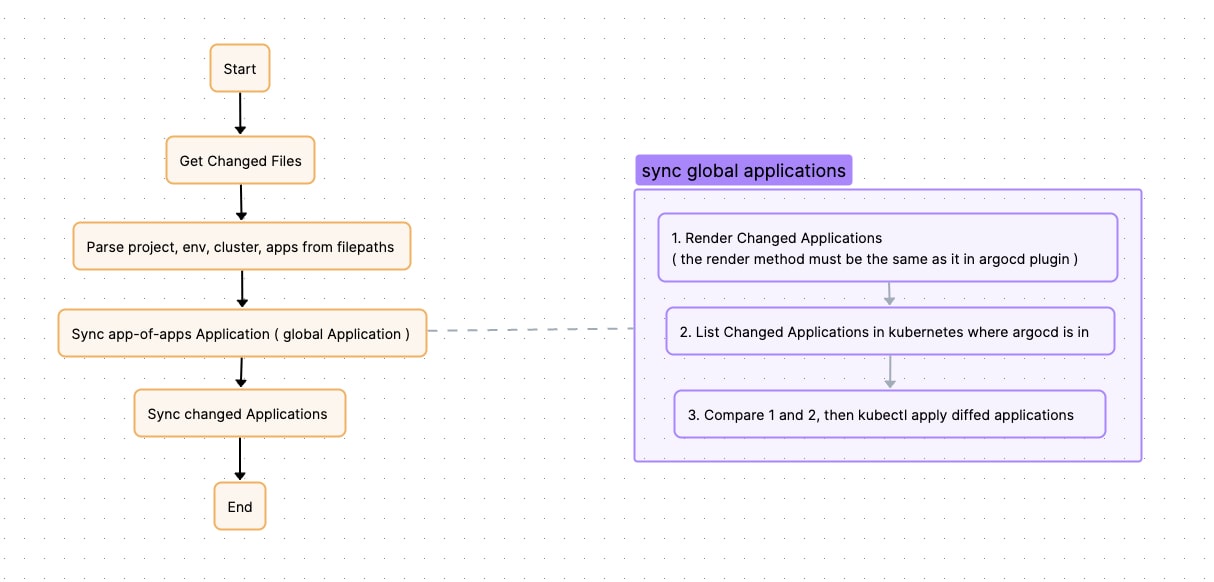
After the above optimization, we can achieve user release completion within 30-50s even when one argocd manages nearly 7k applications in the same repo. (Where sync global app is about 10s, argocd sync app is about 15-35s) And it will not affect the release between various users.
But there are still problems affecting the stability of argocd
After completing the above performance optimization, although argocd can meet the requirements of business release, and in most cases, the release speed can meet the business requirements. Unfortunately, there are still some problems that cause argocd jitter.
When resources in the business Kubernetes cluster change, ArgoCD will refresh the Applications to which the resources belong. During the refresh process, the controller will check the cache. If the cache exists, the processing ends; if the cache does not exist, it will request the repo server to re-render the resource. In most cases, refreshing Applications will hit the cache, but in some extreme cases, the cache may not be hit, causing the request to fall back to the repo server. Since repo server rendering resources is very time-consuming and occupies a large amount of CPU, when a large number of rendering requests flood the repo server, it will cause its CPU to be fully occupied, and even OOM situations, which in turn leads to normal synchronization requests being unable to handle, and user publishing timeout. Reasons causing this problem may include:
- When business DevOps batch operates data in the cluster, for example, batch restarts deployments, when ArgoCD listens to deployments being modified or pods being deleted/created, it will find the corresponding Applications and refresh them. This causes a large number of applications to be refreshed in a short period.
- When DevOps upgrades the business cluster, due to the need to replace nodes, this will cause a large number of pods to be recreated, which in turn causes a large number of Applications to be refreshed in a short period.
- Some CRDs that are frequently updated by operators will also trigger Applications refresh. For example, KEDA will frequently change HPA specs, causing Applications to be frequently refreshed.
Optimization Method
After argocd 2.8, parameters are provided to ignore monitoring of specific fields of some resources in the cluster:
# argo-cd helm values.yaml

# For example, here configured changes to `.status` and `.metadata.resourceVersion` of all resources will not trigger argocd refresh
server:
  config:
    resource.customizations.ignoreResourceUpdates.all: |
      jsonPointers:
      - /status
      - /metadata/resourceVersion
But this still cannot completely solve the problem, because there are always some slipping through the net, such as a newly deployed operator frequently modifying its CRD spec and so on. Therefore, we need to think of other ways to cure this problem.
Then we thought, because we disabled auto sync for all Applications, this mechanism of monitoring resource changes + refreshing Application is actually dispensable for us.
Therefore, we modified the code of the argocd controller:
If a resource change is monitored, but the application to which this resource belongs does not have auto sync enabled or is not being operated (being manually synced), then do not refresh the Application.
So far, this problem has been completely solved.
The PR for the change:
Improve performance for refreshing apps by domechn · Pull Request #1 · domechn/argo-cd (github.com)
Besides, ensure that the repo server will not be hit to OOM due to a large number of requests in a short time
First, repo server OOM will inevitably cause the failure of the currently processing argocd sync request. Secondly, because the repo server has to re-pull the code after restart, it will greatly prolong the time of the next argocd sync, affecting release stability.
However, argocd provides the parameter reposerver.parallelism.limit, which can limit the number of rendering requests processed concurrently by the repo server at the same time. This value is an empirical value, which may need to be adjusted based on the mono repo size and repo server pod resource. Based on our own experience, our repo is about 4G, repo server resource limit is given 12Gi4vCPU, sidecar plugin is 6Gi4vCPU, then setting it to 15, the repo server will almost never be hit to OOM.
After such optimization, the performance performance of argocd has finally become stable, with almost rarely jitter, and theoretically the performance afterwards will not be too affected by the growth of the number of applications (maybe there will be, but currently not found)