This article mainly focuses on the implementation of two DNS Servers, and compares the advantages and disadvantages of the two Servers.
Before talking about the two Services, let's first understand how domain names are resolved in k8s.
We all know that in k8s, if a Pod wants to visit a Service (such as user-svc) under the same Namespace, it only needs to curl user-svc. If the Pod and Service are not in the same domain, then you need to append the Namespace where the Service is located after the Service Name (such as beta), curl user-svc.beta. So how does k8s know that these domain names are internal domain names and resolve them?
DNS In Kubernetes
/etc/resolv.conf
resolv.conf is the configuration file for DNS domain name resolution. Each line starts with a keyword, followed by configuration parameters. There are 3 main keywords used here.
- nameserver # Defines the IP address of the DNS server
- search # Defines the domain name search list. When the number of
.contained in the queried domain name is less than the value ofoptions.ndots, each value in the list will be matched in sequence. - options # Defines configuration information when looking up domain names
So let's enter a Pod to check its resolv.conf
nameserver 100.64.0.10
search default.svc.cluster.local svc.cluster.local cluster.local
options ndots:5
The nameserver, search and options here can all be configured through the dnsConfig field. There is a detailed description in the official documentation.
The above configuration file resolv.conf is automatically generated by k8s for the Pod in the case of dnsPolicy: ClusterFirst. The address corresponding to nameserver here is exactly the Cluster IP of the DNS Service (this value is specified through clusterDNS when starting kubelet). Therefore, all domain name resolutions requested from within the cluster need to pass through the DNS Service for resolution, whether it is an internal k8s domain name or an external domain name.
It can be seen that the search domain here defaults to include three types: namespace.svc.cluster.local, svc.cluster.local and cluster.local. When we visit a Service (curl a) in the Pod, it will select nameserver 100.64.0.10 for resolution, and then substitute into the search domain for DNS lookup in turn until it is found.
# curl a
a.default.svc.cluster.local
Obviously because the Pod and a Service are in the same Namespace, it can be found in the first lookup.
If the Pod wants to visit Service b (curl b.beta) under a different Namespace (eg: beta), it needs to go through two DNS lookups, namely
# curl b.beta
b.beta.default.svc.cluster.local (Not found)
b.beta.svc.cluster.local (Found)
It is precisely because of the order of search that visiting a Service under the same Namespace, curl a is more efficient than curl a.default, because the latter goes through one more DNS resolution.
# curl a
a.default.svc.cluster.local
# curl a.default
b.default.default.svc.cluster.local (Not found)
b.default.svc.cluster.local (Found)
So when visiting external domain names in Pod, does it still need to go through the search domain?
The answer to this cannot be affirmative or negative, it depends on the situation. It can be said that in most cases, it needs to go through the search domain.
Taking domgoer.com as an example, normally when accessing domgoer.com in a Pod, the DNS lookup process can be seen by capturing packets. First enter the network of the DNS container.
ps: Since DNS containers often do not have bash, you cannot enter the container to capture packets via docker exec. You need to use other methods.
// 1. Find container ID, print its NS ID
docker inspect --format "{{.State.Pid}}" container_id
// 2. Enter the Namespace of this container
nsenter -n -t pid
// 3. DNS packet capture
tcpdump -i eth0 -N udp dst port 53
Perform domgoer.com domain lookup in other containers
nslookup domgoer.com dns_container_ip
Specify dns_container_ip to avoid the situation where there are multiple DNS containers, and DNS requests will be distributed to each container. This allows DNS requests to be sent only to this address, so that the captured packet data will be complete.
The following results can be seen:
17:01:28.732260 IP 172.20.92.100.36326 > nodexxxx.domain: 4394+ A? domgoer.com.default.svc.cluster.local. (50)
17:01:28.733158 IP 172.20.92.100.49846 > nodexxxx.domain: 60286+ A? domgoer.com.svc.cluster.local. (45)
17:01:28.733888 IP 172.20.92.100.51933 > nodexxxx.domain: 63077+ A? domgoer.com.cluster.local. (41)
17:01:28.734588 IP 172.20.92.100.33401 > nodexxxx.domain: 27896+ A? domgoer.com. (27)
17:01:28.734758 IP nodexxxx.34138 > 192.168.x.x.domain: 27896+ A? domgoer.com. (27)
It can be seen that before actually resolving domgoer.com, it went through domgoer.com.default.svc.cluster.local. -> domgoer.com.svc.cluster.local. -> domgoer.com.cluster.local. -> domgoer.com.
This implies that 3 DNS requests were wasted and meaningless.
How to avoid such situation
Before researching how to avoid it, we can first think about the reason for this situation. In the /etc/resolv.conf file, we can see a configuration item ndots:5 in options.
ndots:5 means: if the Domain to be looked up contains fewer than 5 ., non-absolute domain names will be used. If the queried DNS contains greater than or equal to 5 ., then absolute domain names will be used. If it is an absolute domain name, it will not go through the search domain. If it is a non-absolute domain name, it will be matched and queried one by one according to the search domain. If the search is completed and not found, then original domain name. (domgoer.com.) will be used as the absolute domain name for lookup.
In summary, two optimization methods can be found
- Use absolute domain name directly
This is the simplest and most direct optimization method. You can directly add . after the domain name to be visited, such as: domgoer.com. , so as to avoid matching through the search domain.
- Configure ndots
Remember that it was mentioned earlier that parameters in /etc/resolv.conf can all be configured through the dnsConfig field in k8s. This allows you to configure domain name resolution rules according to your own needs.
For example, when the domain name contains two . or more, absolute domain name can be used directly for domain name resolution.
yaml
   apiVersion: v1
   kind: Pod
   metadata:
   namespace: default
   name: dns-example
   spec:
   containers:
     - name: test
       image: nginx
   dnsConfig:
     options:
       - name: ndots
         value: 2
Kubernetes DNS Policy
In k8s, there are 4 DNS policies, namely ClusterFirstWithHostNet, ClusterFirst, Default, and None. These policies can be defined via the dnsPolicy field.
If not defined when initializing Pod, Deployment or RC resources, ClusterFirst policy will be used by default.
- ClusterFirstWithHostNet
When a Pod starts in HOST mode (sharing network with the host), all containers in this POD will use the host's /etc/resolv.conf configuration for DNS queries, but if you still want to continue using Kubernetes' DNS service, you need to set dnsPolicy to ClusterFirstWithHostNet.
- ClusterFirst
Using this method means that the DNS inside the Pod will prioritize using the DNS service within the k8s cluster, that is, using kubedns or coredns for domain name resolution. If resolution is unsuccessful, the host's DNS configuration will be used for resolution.
- Default
This method lets kubelet decide which DNS policy to use for DNS inside the Pod. The default method of kubelet is actually using the host's /etc/resolv.conf for resolution. You can decide the address of the DNS resolution file by setting kubelet's startup parameter --resolv-conf=/etc/resolv.conf.
- None
As the name implies, this method will not use the cluster and host DNS policies. Instead, it is used together with dnsConfig to customize DNS configuration, otherwise an error will be reported when submitting changes.
kubeDNS
Structure
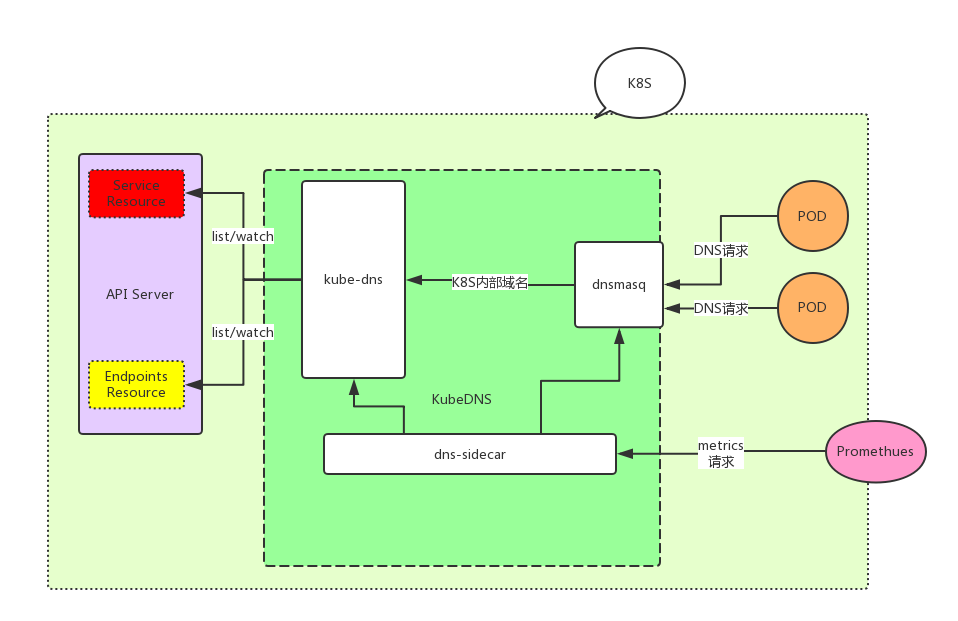
kubeDNS is composed of 3 parts.
- kubedns: Relies on the
informermechanism inclient-goto monitor the changes ofServiceandEndpointin k8s, and maintain these structures into memory to serve internal DNS resolution requests. - dnsmasq: Distinguish whether the Domain is internal or external to the cluster, provide upstream resolution for external domain names, send internal domain names to port 10053, and cache resolution results to improve resolution efficiency.
- sidecar: Perform health checks and collect monitoring metrics on kubedns and dnsmasq.
Below is the structure diagram
kubedns
kubedns contains two parts, kubedns and skydns.
Among them, kubedns is responsible for listening to the changes of Service and Endpoint in the k8s cluster, and caching these changes through the data structure of treecache, providing Records to skydns as Backend.
And the one really responsible for dns resolution is actually skydns (skydns currently has two versions skydns1 and skydns2, what is mentioned below is skydns2, which is also the version currently used by kubedns).
We can look at treecache first. The following is the data structure of treecache
// /dns/pkg/dns/treecache/treecache.go#54
type treeCache struct {
    ChildNodes map[string]*treeCache
    Entries    map[string]interface{}
}
Let's look at a set of actual data
{
  "ChildNodes": {
    "local": {
      "ChildNodes": {
        "cluster": {
          "ChildNodes": {
            "svc": {
              "ChildNodes": {
                "namespace": {
                  "ChildNodes": {
                    "service_name": {
                      "ChildNodes": {
                        "_tcp": {
                          "ChildNodes": {
                            "_http": {
                              "ChildNodes": {},
                              "Entries": {
                                "6566333238383366": {
                                  "host": "service.namespace.svc.cluster.local.",
                                  "port": 80,
                                  "priority": 10,
                                  "weight": 10,
                                  "ttl": 30
                                }
                              }
                            }
                          },
                          "Entries": {}
                        }
                      },
                      "Entries": {
                        "3864303934303632": {
                          "host": "100.70.28.188",
                          "priority": 10,
                          "weight": 10,
                          "ttl": 30
                        }
                      }
                    }
                  },
                  "Entries": {}
                }
              },
              "Entries": {}
            }
          },
          "Entries": {}
        }
      },
      "Entries": {}
    }
  },
  "Entries": {}
}
The structure of treeCache is similar to a directory tree. Each path from the root node to the leaf node corresponds to a domain name, and the order is reversed. Its leaf nodes only contain Entries, and non-leaf nodes only contain ChildNodes. What is saved in the leaf nodes is the msg.Service structure defined by SkyDNS, which can be understood as a DNS record.
In the implementation of the Records interface method, it is only necessary to find the corresponding leaf node based on the domain name, and return all msg.Service data saved in the leaf node. K8S uses such a data structure to save DNS records, replacing Etcd (skydns2 uses etcd as storage by default) to provide efficient memory-based storage.
We can read the code directly to understand the startup process of kubedns.
First look at its structure
// dns/cmd/kube-dns/app/server.go#43
type KubeDNSServer struct {
    // DNS domain name. = cluster.local.
    domain         string
    healthzPort    int
    // Address and port where skydns starts
    dnsBindAddress string
    dnsPort        int
    nameServers    string
    kd             *dns.KubeDNS
}
Next, simpler, you can see a function called NewKubeDNSServerDefault, which initializes KubeDNSServer. And executed server.Run() to start the service. So let's look at what the NewKubeDNSServerDefault method does.
// dns/cmd/kube-dns/app/server.go#53
func NewKubeDNSServerDefault(config *options.KubeDNSConfig) *KubeDNSServer {
    kubeClient, err := newKubeClient(config)
    if err != nil {
      glog.Fatalf("Failed to create a kubernetes client: %v", err)
    }

    // Sync configuration file, if configuration change is observed, skydns will be restarted
    var configSync dnsconfig.Sync
    switch {
    // Cannot configure both ConfigMap and ConfigDir
    case config.ConfigMap != "" && config.ConfigDir != "":
      glog.Fatal("Cannot use both ConfigMap and ConfigDir")
    case config.ConfigMap != "":
      configSync = dnsconfig.NewConfigMapSync(kubeClient, config.ConfigMapNs, config.ConfigMap)
    case config.ConfigDir != "":
      configSync = dnsconfig.NewFileSync(config.ConfigDir, config.ConfigPeriod)
    default:
      conf := dnsconfig.Config{Federations: config.Federations}
      if len(config.NameServers) > 0 {
        conf.UpstreamNameservers = strings.Split(config.NameServers, ",")
      }
      configSync = dnsconfig.NewNopSync(&conf)
    }

    return &KubeDNSServer{
      domain:         config.ClusterDomain,
      healthzPort:    config.HealthzPort,
      dnsBindAddress: config.DNSBindAddress,
      dnsPort:        config.DNSPort,
      nameServers:    config.NameServers,
      kd:             dns.NewKubeDNS(kubeClient, config.ClusterDomain, config.InitialSyncTimeout, configSync),
    }
}

// Start skydns server
func (d *KubeDNSServer) startSkyDNSServer() {
    skydnsConfig := &server.Config{
      Domain:  d.domain,
      DnsAddr: fmt.Sprintf("%s:%d", d.dnsBindAddress, d.dnsPort),
    }
    if err := server.SetDefaults(skydnsConfig); err != nil {
      glog.Fatalf("Failed to set defaults for Skydns server: %s", err)
    }
    // Use d.kd as storage backend, because kubedns implements skydns.Backend interface
    s := server.New(d.kd, skydnsConfig)
    if err := metrics.Metrics(); err != nil {
      glog.Fatalf("Skydns metrics error: %s", err)
    } else if metrics.Port != "" {
      glog.V(0).Infof("Skydns metrics enabled (%v:%v)", metrics.Path, metrics.Port)
    } else {
      glog.V(0).Infof("Skydns metrics not enabled")
    }

    d.kd.SkyDNSConfig = skydnsConfig
    go s.Run()
}
It can be seen that dnsconfig here will return a configSync interface for real-time configuration synchronization, which is the kube-dns configmap, or local dir (but generally this dir is also mounted by configmap). At the end of the method, dns.NewKubeDNS returns a KubeDNS structure. So let's look at what this function initialized.
// dns/pkg/dnsdns.go#124
func NewKubeDNS(client clientset.Interface, clusterDomain string, timeout time.Duration, configSync config.Sync) *KubeDNS {
    kd := &KubeDNS{
      kubeClient:          client,
      domain:              clusterDomain,
      cache:               treecache.NewTreeCache(),
      cacheLock:           sync.RWMutex{},
      nodesStore:          kcache.NewStore(kcache.MetaNamespaceKeyFunc),
      reverseRecordMap:    make(map[string]*skymsg.Service),
      clusterIPServiceMap: make(map[string]*v1.Service),
      domainPath:          util.ReverseArray(strings.Split(strings.TrimRight(clusterDomain, "."), ".")),
      initialSyncTimeout:  timeout,

      configLock: sync.RWMutex{},
      configSync: configSync,
    }

    kd.setEndpointsStore()
    kd.setServicesStore()

    return kd
}
It can be seen that kd.setEndpointsStore() and kd.setServicesStore() methods will register callbacks for Service and Endpoint in informer to observe changes in these resources and make corresponding adjustments.
Below we look at how kubedns handles when a new Service is added to the cluster.
// dns/pkg/dns/dns.go#499
func (kd *KubeDNS) newPortalService(service *v1.Service) {
    // Constructed an empty leaf node, recordLabel is a 32-bit number obtained after FNV-1a hash operation on clusterIP
    // Structure of recordValue
    // &msg.Service{
    //  Host:     service.Spec.ClusterIP,
    //  Port:     0,
    //  Priority: defaultPriority,
    //  Weight:   defaultWeight,
    //  Ttl:      defaultTTL,
    // }
    subCache := treecache.NewTreeCache()
    recordValue, recordLabel := util.GetSkyMsg(service.Spec.ClusterIP, 0)
    subCache.SetEntry(recordLabel, recordValue, kd.fqdn(service, recordLabel))

    // List ports of service, convert each port info to skydns.Service and add to the leaf node constructed above
    for i := range service.Spec.Ports {
      port := &service.Spec.Ports[i]
      if port.Name != "" && port.Protocol != "" {
        srvValue := kd.generateSRVRecordValue(service, int(port.Port))

        l := []string{"_" + strings.ToLower(string(port.Protocol)), "_" + port.Name}

        subCache.SetEntry(recordLabel, srvValue, kd.fqdn(service, append(l, recordLabel)...), l...)
      }
    }
    subCachePath := append(kd.domainPath, serviceSubdomain, service.Namespace)
    host := getServiceFQDN(kd.domain, service)
    reverseRecord, _ := util.GetSkyMsg(host, 0)

    kd.cacheLock.Lock()
    defer kd.cacheLock.Unlock()
    // Add constructed leaf node to treecache
    kd.cache.SetSubCache(service.Name, subCache, subCachePath...)
    kd.reverseRecordMap[service.Spec.ClusterIP] = reverseRecord
    kd.clusterIPServiceMap[service.Spec.ClusterIP] = service
}
Look again at how kubedns handles when Endpoint is added to the cluster
// dns/pkg/dns/dns.go#460
func (kd *KubeDNS) addDNSUsingEndpoints(e *v1.Endpoints) error {
    // Get svc belonging to ep
    svc, err := kd.getServiceFromEndpoints(e)
    if err != nil {
      return err
    }
    // Determine this svc. If this svc is not headless, this addition will not be processed, because usually svc has clusterIP, which is processed
    // when handling svc add/delete/update. So when ep belongs to headless svc, this ep needs to be added to cache
    if svc == nil || v1.IsServiceIPSet(svc) || svc.Spec.Type == v1.ServiceTypeExternalName {
      // No headless service found corresponding to endpoints object.
      return nil
    }
    return kd.generateRecordsForHeadlessService(e, svc)
}

// Add endpoint to cache of headless service it belongs to
func (kd *KubeDNS) generateRecordsForHeadlessService(e *v1.Endpoints, svc *v1.Service) error {
    subCache := treecache.NewTreeCache()
    generatedRecords := map[string]*skymsg.Service{}
    // Traverse all ip+port under this ep, and add them to treecache
    for idx := range e.Subsets {
      for subIdx := range e.Subsets[idx].Addresses {
        address := &e.Subsets[idx].Addresses[subIdx]
        endpointIP := address.IP
        recordValue, endpointName := util.GetSkyMsg(endpointIP, 0)
        if hostLabel, exists := getHostname(address); exists {
          endpointName = hostLabel
        }
        subCache.SetEntry(endpointName, recordValue, kd.fqdn(svc, endpointName))
        for portIdx := range e.Subsets[idx].Ports {
          endpointPort := &e.Subsets[idx].Ports[portIdx]
          if endpointPort.Name != "" && endpointPort.Protocol != "" {
            srvValue := kd.generateSRVRecordValue(svc, int(endpointPort.Port), endpointName)
            l := []string{"_" + strings.ToLower(string(endpointPort.Protocol)), "_" + endpointPort.Name}
            subCache.SetEntry(endpointName, srvValue, kd.fqdn(svc, append(l, endpointName)...), l...)
          }
        }

        // Generate PTR records only for Named Headless service.
        if _, has := getHostname(address); has {
          reverseRecord, _ := util.GetSkyMsg(kd.fqdn(svc, endpointName), 0)
          generatedRecords[endpointIP] = reverseRecord
        }
      }
    }
    subCachePath := append(kd.domainPath, serviceSubdomain, svc.Namespace)
    kd.cacheLock.Lock()
    defer kd.cacheLock.Unlock()
    for endpointIP, reverseRecord := range generatedRecords {
      kd.reverseRecordMap[endpointIP] = reverseRecord
    }
    kd.cache.SetSubCache(svc.Name, subCache, subCachePath...)
    return nil
}
The overall process is actually similar to Service, but before adding cache, it will first find the Service that Endpoint belongs to. Then differently, the host in the leaf node of Endpoint stores data like EndpointIP, while the host of Service's leaf node stores fqdn.
kubedns Summary
-
kubedns has two modules, kubedns and skydns. kubedns is responsible for listening to
ServiceandEndpointand converting them into formats that skydns can understand, existing in memory in the form of a directory tree. -
Because skydns uses etcd standard as backend storage, so in order to be compatible with etcd, kubedns defines error information in etcd format. Therefore, the role of kubedns can actually be understood as providing storage for skydns.
dnsmasq
dnsmasq consists of two parts
- dnsmasq-nanny: Process number 1 in container, not responsible for handling DNS LookUp requests, only responsible for managing dnsmasq.
- dnsmasq: Responsible for handling DNS LookUp requests and caching results.
dnsmasq-nanny is responsible for monitoring the change of the config file (/etc/k8s/dns/dnsmasq-nanny, which is the location mounted by kube-dns-config configmap) (checked every 10s). If the config changes, it will Kill dnsmasq and restart it.
// dns/pkg/dnsmasq/nanny.go#198
// RunNanny starts nanny service and handles configuration changes
func RunNanny(sync config.Sync, opts RunNannyOpts, kubednsServer string) {
    //  ...
    configChan := sync.Periodic()
    for {
      select {
      // ...
      // config change observed
      case currentConfig = <-configChan:
        if opts.RestartOnChange {
          // Kill dnsmasq process directly
          nanny.Kill()
          nanny = &Nanny{Exec: opts.DnsmasqExec}
          // Reload configuration
          nanny.Configure(opts.DnsmasqArgs, currentConfig, kubednsServer)
          // Restart dnsmasq process
          nanny.Start()
        } else {
          glog.V(2).Infof("Not restarting dnsmasq (--restartDnsmasq=false)")
        }
        break
      }
    }
}
Let's look at what sync.Periodic() function does
// dns/pkg/dns/config/sync.go#81
func (sync *kubeSync) Periodic() <-chan *Config {
    go func() {
      // Periodic function sets a Tick, loads every 10s
      // all files under configDir, and calculates sha256 digest for each file
      // and returns this result.
      resultChan := sync.syncSource.Periodic()
      for {
        syncResult := <-resultChan
        // processUpdate function compares versions of new files and old
        // files, if inconsistent returns changed.
        // It is worth noting that three files need special handling
        // federations
        // stubDomains
        // upstreamNameservers
        // When these three files change, separate functions (logging) will be triggered
        config, changed, err := sync.processUpdate(syncResult, false)
        if err != nil {
          continue
        }
        if !changed {
          continue
        }
        sync.channel <- config
      }
    }()
    return sync.channel
}
How is configuration loaded in dnsmasq?
// dns/pkg/dnsmasq/nanny.go#58
// Configure the nanny. This must be called before Start().
// This function will configure dnsmasq. Every time Nanny Kills dnsmasq, it will call this function before calling Start()
// to reload configuration.
func (n *Nanny) Configure(args []string, config *config.Config, kubednsServer string) {
    // ...
    for domain, serverList := range config.StubDomains {
      resolver := &net.Resolver{
        PreferGo: true,
        Dial: func(ctx context.Context, network, address string) (net.Conn, error) {
          d := net.Dialer{}
          return d.DialContext(ctx, "udp", kubednsServer)
        },
      }
      // Because stubDomain can exist in the form of host:port, one more upstream dns resolution is needed here
      for _, server := range serverList {
        if isIP := (net.ParseIP(server) != nil); !isIP {
          switch {
          // If server ends with cluster.local (don't know why it is hardcoded here), it will be sent to kubednsServer for DNS resolution
          // Because d.DialContext(ctx, "udp", kubednsServer) is configured above
          case strings.HasSuffix(server, "cluster.local"):
            // ...
            resolver.LookupIPAddr(context.Background(), server)
          default:
          // If not ending with cluster.local, it will go through external DNS resolution
            // ...
            net.LookupIP(server)
          }
        }
      }
    }
    // ...
}
sidecar
After sidecar starts, a coroutine is started internally, and every default 5s in the loop sends a dns resolution to kubedns. And record the resolution result.
sidecar provides two http interfaces /healthcheck/kubedns and /healthcheck/dnsmasq for k8s to use as livenessProbe health check. For each request, sidecar will return the DNS resolution result recorded above.
Pros and Cons of kubedns
Pros
- All modules are well decoupled, easy for developers to get started.
- Relying on dnsmasq, performance is guaranteed
Cons
-
Because dnsmasq-nanny restarts dnsmasq by kill first then start, the method is relatively brute, potentially causing massive DNS request failures during this period.
-
The way dnsmasq-nanny detects files may lead to the following problems:
-
dnsmasq-nanny traverses all files in the directory each time, then reads file content using ioutil.ReadFile. If there are too many files in the directory, it may appear that files are being modified while traversing, and traversal speed cannot keep up with modification speed. This may lead to traversal completion, but a certain configuration file just finished updating. Then at this time, part of the file data you read is not completely consistent with the file data in the current directory. This time dnsmasq will be restarted. Further, next detection, it is still considered that there are file changes, and by then, dnsmasq is restarted again. This way is not elegant, but not a big problem.
-
File detection uses ioutil.ReadFile directly to read file content, which also has problems. If file change and file reading happen at the same time, likely after you finish reading, file update is not completed, then what you read is not a complete file, but a bad file. This kind of file, dnsmasq-nanny cannot resolve. But official code has data checksum, resolution failure is not a big problem, wait for next cycle, get complete data again, resolve again.
CoreDNS
CoreDNS is a fast and extremely flexible DNS service. CoreDNS allows you to handle DNS data yourself by writing plugins.
Structure Diagram
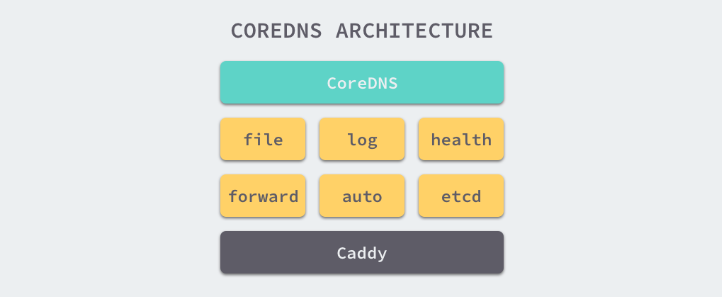
CoreDNS uses Caddy as the underlying Web Server. Caddy is a lightweight, easy-to-use Web Server that supports HTTP, HTTPS, HTTP/2, GRPC and other connection methods. So coreDNS can provide DNS services directly externally in four ways, namely UDP, gRPC, HTTPS and TLS.
Most functions of CoreDNS are implemented by plugins. Plugins and the service itself use some functions provided by Caddy, so the project itself is not particularly complex.
Plugins
CoreDNS defines a set of plugin interfaces. Just implementing the Handler interface allows registering the plugin into the plugin chain.
type (
    // Only need to implement ServeDNS and Name interfaces for the plugin and write some configuration code to integrate the plugin into CoreDNS
    Handler interface {
        ServeDNS(context.Context, dns.ResponseWriter, *dns.Msg) (int, error)
        Name() string
    }
)
Now CoreDNS supports about 40 kinds of plugins.
kubernetes
This plugin allows coreDNS to read endpoint and service information in the k8s cluster, thereby replacing kubeDNS as the DNS resolution service within the k8s cluster. Not only that, this plugin also supports multiple configurations such as:
kubernetes [ZONES...] {
    ; Use this config to connect to remote k8s cluster
    kubeconfig KUBECONFIG CONTEXT
    endpoint URL
    tls CERT KEY CACERT
    ; Set namespace list of Services to be exposed
    namespaces NAMESPACE...
    ; Can expose namespaces with specific labels
    labels EXPRESSION
    ; Whether to resolve domain like 10-0-0-1.ns.pod.cluster.local (for kube-dns compatibility)
    pods POD-MODE
    endpoint_pod_names
    ttl TTL
    noendpoints
    transfer to ADDRESS...
    fallthrough [ZONES...]
    ignore empty_service
}
forward
Provides upstream resolution function
forward FROM TO... {
    except IGNORED_NAMES...
    ; Force tcp for domain name resolution
    force_tcp
    ; When request is tcp, try udp resolution once first, if failed then use tcp
    prefer_udp
    expire DURATION
    ; Maximum number of upstream healthcheck failures, default 2, if exceeded upstream will be removed
    max_fails INTEGER
    tls CERT KEY CA
    tls_servername NAME
    ; Strategy to choose nameserver: random, round_robin, sequential
    policy random|round_robin|sequential
    health_check DURATION
}
More plugins can be viewed in CoreDNS's Plugin Market
Corefile
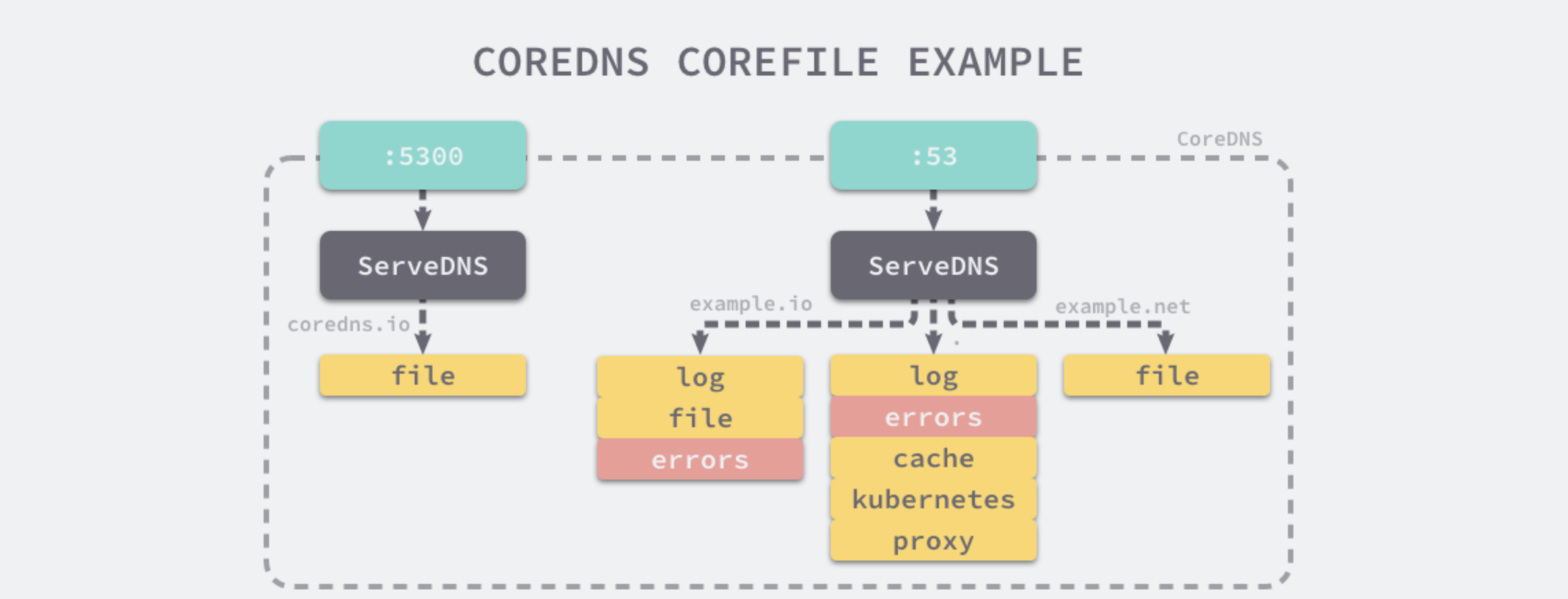
CoreDNS provides a simple and easy-to-understand DSL language that allows you to customize DNS services via Corefile.
coredns.io:5300 {
    file db.coredns.io
}

example.io:53 {
    log
    errors
    file db.example.io
}

example.net:53 {
    file db.example.net
}

.:53 {
    kubernetes
    proxy . 8.8.8.8
    log
    errors
    cache
}
With the above configuration, CoreDNS will open two ports 5300 and 53 to provide DNS resolution services. coredns.io related domains will be resolved via port 5300, other domains will be resolved to port 53, and different domains will apply different plugins.
Plugin Principle
In CoreDNS Plugin is actually a function whose input and output parameters are both Handler
// The so-called plugin chain is actually a Middle layer, linking a Handler to the next Handler by passing the next Handler in the chain.
type  Plugin func(Handler) Handler
At the same time, CoreDNS provides NextOrFailure method for each plugin to execute the next plugin after executing its own logic.
// NextOrFailure calls next.ServeDNS when next is not nil, otherwise it will return, a ServerFailure and a nil error.
func NextOrFailure(name string, next Handler, ctx context.Context, w dns.ResponseWriter, r *dns.Msg) (int, error) { // nolint: golint
    if next != nil {
      if span := ot.SpanFromContext(ctx); span != nil {
        child := span.Tracer().StartSpan(next.Name(), ot.ChildOf(span.Context()))
        defer child.Finish()
        ctx = ot.ContextWithSpan(ctx, child)
      }
      return next.ServeDNS(ctx, w, r)
    }

    return dns.RcodeServerFailure, Error(name, errors.New("no next plugin found"))
}
If next is nil, it means the plugin chain call has ended, just return no next plugin found error directly.
Each Plugin can also call (dns.ResponseWriter).WriteMsg(*dns.Msg) method to end the entire call chain.
What kubernetes plugin does
CoreDNS implements parsing internal domain names of k8s cluster purely through kubernetes plugin. So let's see what this plugin did.
// coredns/plugin/kubernetes/setup.go#44
func setup(c *caddy.Controller) error {
    // Checked kubernetes configuration definition in corefile, and configured some default values
    k, err := kubernetesParse(c)
    if err != nil {
      return plugin.Error("kubernetes", err)
    }
    // Started watch for add/delete/update of pod, service, endpoint resources, and registered some callbacks
    // Note: whether to start pod watch depends on the value of pod in configuration file, if value is not verified, pod watch will not be started
    // The watch method here observes changes and only changes dns.modified value, setting it to current timestamp
    err = k.InitKubeCache()
    if err != nil {
      return plugin.Error("kubernetes", err)
    }

    // Register plugin to Caddy, allowing Caddy to start this plugin when starting
    k.RegisterKubeCache(c)

    // Register plugin to call chain
    dnsserver.GetConfig(c).AddPlugin(func(next plugin.Handler) plugin.Handler {
      k.Next = next
      return k
    })

    return nil
}
// coredns/plugin/kubernetes/controller.go#408
// These three methods are callbacks when watching resources
func (dns *dnsControl) Add(obj interface{})               { dns.detectChanges(nil, obj) }
func (dns *dnsControl) Delete(obj interface{})            { dns.detectChanges(obj, nil) }
func (dns *dnsControl) Update(oldObj, newObj interface{}) { dns.detectChanges(oldObj, newObj) }

// detectChanges detects changes in objects, and updates the modified timestamp
func (dns *dnsControl) detectChanges(oldObj, newObj interface{}) {
    // Determine version of new and old objects
    if newObj != nil && oldObj != nil && (oldObj.(meta.Object).GetResourceVersion() == newObj.(meta.Object).GetResourceVersion()) {
      return
    }
    obj := newObj
    if obj == nil {
      obj = oldObj
    }
    switch ob := obj.(type) {
    case *object.Service:
      dns.updateModifed()
    case *object.Endpoints:
      if newObj == nil || oldObj == nil {
        dns.updateModifed()
        return
      }
      p := oldObj.(*object.Endpoints)
      // endpoint updates can come frequently, make sure it's a change we care about
      if endpointsEquivalent(p, ob) {
        return
      }
      dns.updateModifed()
    case *object.Pod:
      dns.updateModifed()
    default:
      log.Warningf("Updates for %T not supported.", ob)
    }
}

func (dns *dnsControl) Modified() int64 {
    unix := atomic.LoadInt64(&dns.modified)
    return unix
}

// updateModified set dns.modified to the current time.
func (dns *dnsControl) updateModifed() {
    unix := time.Now().Unix()
    atomic.StoreInt64(&dns.modified, unix)
}
What shown above is the callback of kubernetes Plugin after Watching each resource change. You can see it only changes one value dns.modified. So when Service changes, how does kubernetes plugin perceive and update them to memory? Actually there is no or no need to... because informer mechanism in client-go is used here. Kubernetes, when resolving Service DNS, lists all Services directly (strictly speaking not accurate here, if looking up wildcard domain, then all Services will be listed, if it is normal servicename.namespace, then plugin uses Indexer mechanism of client-go, looking up matching ServiceList according to index), then matches, until finding matching Service then decide return result according to its type. If ClusterIP type, return svc's ClusterIP, if Headless type, return all its Endpoint IPs, if ExternalName type, and external_name value is CNAME type, then return external_name value. The whole operation is still carried out in memory, efficiency will not be very low.
// findServices returns the services matching r from the cache.
func (k *Kubernetes) findServices(r recordRequest, zone string) (services []msg.Service, err error) {
    // If namespace is * or any, or this namespace is not configured in namespace: configuration item in config file
    // return NXDOMAIN
    if !wildcard(r.namespace) && !k.namespaceExposed(r.namespace) {
      return nil, errNoItems
    }

    // If lookup service is empty
    if r.service == "" {
      //  If namespace exists or namespace is wildcard, return empty Service list
      if k.namespaceExposed(r.namespace) || wildcard(r.namespace) {
        // NODATA
        return nil, nil
      }
      // Otherwise return NXDOMAIN
      return nil, errNoItems
    }

    err = errNoItems
    if wildcard(r.service) && !wildcard(r.namespace) {
      // If namespace exists, err should be nil, so that we return NODATA instead of NXDOMAIN
      if k.namespaceExposed(r.namespace) {
        err = nil
      }
    }

    var (
      endpointsListFunc func() []*object.Endpoints
      endpointsList     []*object.Endpoints
      serviceList       []*object.Service
    )

    if wildcard(r.service) || wildcard(r.namespace) {
      // If service or namespace is * or any, list all current Services
      serviceList = k.APIConn.ServiceList()
      endpointsListFunc = func() []*object.Endpoints { return k.APIConn.EndpointsList() }
    } else {
      // Get index according to service.namespace
      idx := object.ServiceKey(r.service, r.namespace)
      // Return serviceList via client-go indexer
      serviceList = k.APIConn.SvcIndex(idx)
      endpointsListFunc = func() []*object.Endpoints { return k.APIConn.EpIndex(idx) }
    }

    // Convert zone to etcd key format
    // /c/local/cluster
    zonePath := msg.Path(zone, coredns)
    for _, svc := range serviceList {
      if !(match(r.namespace, svc.Namespace) && match(r.service, svc.Name)) {
        continue
      }

      // If request namespace is a wildcard, filter results against Corefile namespace list.
      // (Namespaces without a wildcard were filtered before the call to this function.)
      if wildcard(r.namespace) && !k.namespaceExposed(svc.Namespace) {
        continue
      }

      // If looked up Service has no Endpoint, return NXDOMAIN, unless this Service is Headless Service or External name
      if k.opts.ignoreEmptyService && svc.ClusterIP != api.ClusterIPNone && svc.Type != api.ServiceTypeExternalName {
        // serve NXDOMAIN if no endpoint is able to answer
        podsCount := 0
        for _, ep := range endpointsListFunc() {
          for _, eps := range ep.Subsets {
            podsCount = podsCount + len(eps.Addresses)
          }
        }

        // No Endpoints
        if podsCount == 0 {
          continue
        }
      }

      // lookup Service is headless Service or use Endpoint lookup
      if svc.ClusterIP == api.ClusterIPNone || r.endpoint != "" {
        if endpointsList == nil {
          endpointsList = endpointsListFunc()
        }
        for _, ep := range endpointsList {
          if ep.Name != svc.Name || ep.Namespace != svc.Namespace {
            continue
          }

          for _, eps := range ep.Subsets {
            for _, addr := range eps.Addresses {

              // See comments in parse.go parseRequest about the endpoint handling.
              if r.endpoint != "" {
                if !match(r.endpoint, endpointHostname(addr, k.endpointNameMode)) {
                  continue
                }
              }

              for _, p := range eps.Ports {
                if !(match(r.port, p.Name) && match(r.protocol, string(p.Protocol))) {
                  continue
                }
                s := msg.Service{Host: addr.IP, Port: int(p.Port), TTL: k.ttl}
                s.Key = strings.Join([]string{zonePath, Svc, svc.Namespace, svc.Name, endpointHostname(addr, k.endpointNameMode)}, "/")

                err = nil
                // Iterate Endpoints and add result to return list
                services = append(services, s)
              }
            }
          }
        }
        continue
      }

      // External service
      // If svc is External Service
      if svc.Type == api.ServiceTypeExternalName {
        s := msg.Service{Key: strings.Join([]string{zonePath, Svc, svc.Namespace, svc.Name}, "/"), Host: svc.ExternalName, TTL: k.ttl}
        // Add Service to result only when External Name is CNAME
        if t, _ := s.HostType(); t == dns.TypeCNAME {
          s.Key = strings.Join([]string{zonePath, Svc, svc.Namespace, svc.Name}, "/")
          services = append(services, s)

          err = nil
        }
        continue
      }

      // ClusterIP service
      // Normal case, returned msg.Service Host is ClusterIP
      for _, p := range svc.Ports {
        if !(match(r.port, p.Name) && match(r.protocol, string(p.Protocol))) {
          continue
        }

        err = nil

        s := msg.Service{Host: svc.ClusterIP, Port: int(p.Port), TTL: k.ttl}
        s.Key = strings.Join([]string{zonePath, Svc, svc.Namespace, svc.Name}, "/")

        services = append(services, s)
      }
    }
    return services, err
}
Pros and Cons of coredns
Pros
- Very flexible configuration, can configure different plugins for different domain names according to different needs
- Default dns resolution after k8s 1.9 version
Cons
- Caching efficiency is not as good as dnsmasq, resolution speed for internal domain names in cluster is not as good as kube-dns (about 10%)
Performance Comparison
There is already a detailed performance test report on CoreDNS official website, Address
- For internal domain name resolution KubeDNS is superior to CoreDNS by about 10%, probably because dnsmasq optimization for cache is better than CoreDNS
- For external domain names CoreDNS is 3 times better than KubeDNS. But just take a look at this value, because kube-dns does not cache Negative cache. But even if kubeDNS uses Negative cache, performance is still similar
- Memory usage of CoreDNS will be better than KubeDNS