What is Virtual Kubelet
The following is a paraphrased translation from the Virtual Kubelet project documentation.
Virtual Kubelet is an open-source implementation of the Kubernetes kubelet that masquerades as a kubelet for the purposes of connecting Kubernetes to other APIs. This allows the nodes to be backed by other services, e.g. ACI, AWS Fargate, IoT Edge, etc. The primary use case for Virtual Kubelet is to enable the extension of the Kubernetes API to serverless platforms.
Take Alibaba Cloud ECI as an example (hereinafter referred to as ECI for Virtual Kubelet). ECI is Alibaba Cloud's Elastic Container Instance. Each ECI instance can be seen as a Container, so its creation and destruction are very cheap. At the same time, it has the characteristics of fast startup (seconds), low cost (charged by running seconds), and strong elasticity. Through the Kubernetes API provided by Virtual Kubelet, ECI can interact with K8S, and we can perform operations such as creating Pods or deleting Pods on ECI.
Benefits of using Virtual Kubelet to execute Drone tasks
Before using Virtual Kubelet, in order not to affect the stability of the business, we opened several fixed ECS instances in our K8S cluster specifically for CI use (these Nodes were tainted so that business services would not be scheduled on them).
Although this approach ensures the stable operation of CI without affecting the business, it causes a certain degree of waste. Because CI itself is not like most business services that need to run 24 hours a day. The CI scenario requires a lot of resources during the day, but almost consumes no resources at night. So it can be said that these machines are wasting 💰 for close to 1/3 of the time.
Although K8S itself also provides a dynamic scaling mechanism, very few fixed resources can be set and the cluster can be dynamically scaled through CA to reduce resource consumption. However, the startup speed of CA (minute level) cannot meet the high timeliness requirements of CI scenarios.
How to make Drone compatible with ECI
HostPath
Regarding the operation mode of Drone In K8S, you can check the article I wrote before What Happens During a Drone Build in K8S.
Simply put, after receiving the build task, Drone Server will create a Job under its running Namespace (assume CICD). This Job will create a Namespace with a random name, and then execute each Step in the sequence of the configuration file in the created Namespace. Each Step is a Pod. These Pods exchange files through HostPath type Volume.
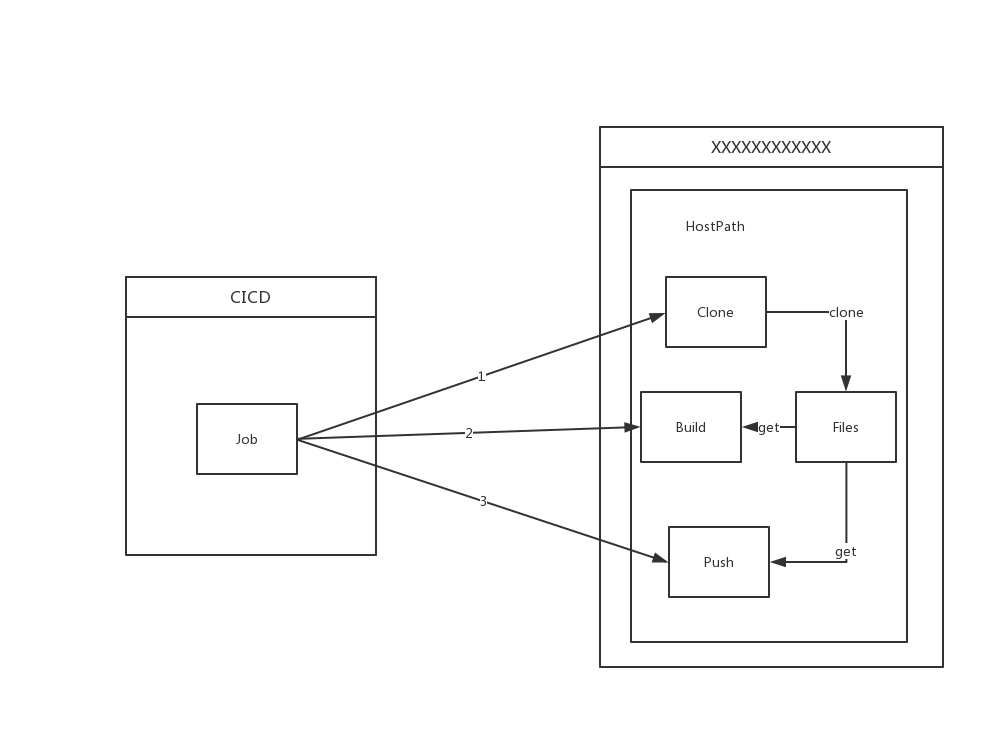
Here comes the problem. ECI does not support HostPath Volume. It only supports EmptyDir, NFS and ConfigFile (i.e., ConfigMap and Secret).
So how to solve the problem of exchanging files between Pods using HostPath mentioned earlier? At first, I thought of replacing HostPath with NFS through Mutating Webhook, so that each Pod uses NFS to share files. This brings the problem of NFS file cleaning. Unlike before when Pipeline execution is finished, os.Remove(path) can be used directly to clean files. Using NFS requires implementing extra Cornjob to clean trivial files on NFS. This adds complexity to relations between services.
Fortunately, after browsing relevant information in the Drone community, I found that Drone released version 1.6. After version 1.6, Drone implemented a separate Runner for K8S.
Difference from the previous way of executing Job, the new execution way is that after receiving build information, Drone Server will store the build information into the memory-based Queue. The runner will pull build information from Server, and then parse build information into one Pod, where each Step is a Container. In order to ensure the sequential execution of Steps (because Container execution is unordered when Pod creates), Kube-Runner sets the Image of each Step not yet scheduled for execution to placeholder. placeholder is a placeholder image, which sleeps constantly without doing anything. Wait until the pre-step completes execution, Kube-Runner will change the Image of the next Step to execute from placeholder to its corresponding image. Through the above operations to complete the orderliness of execution.
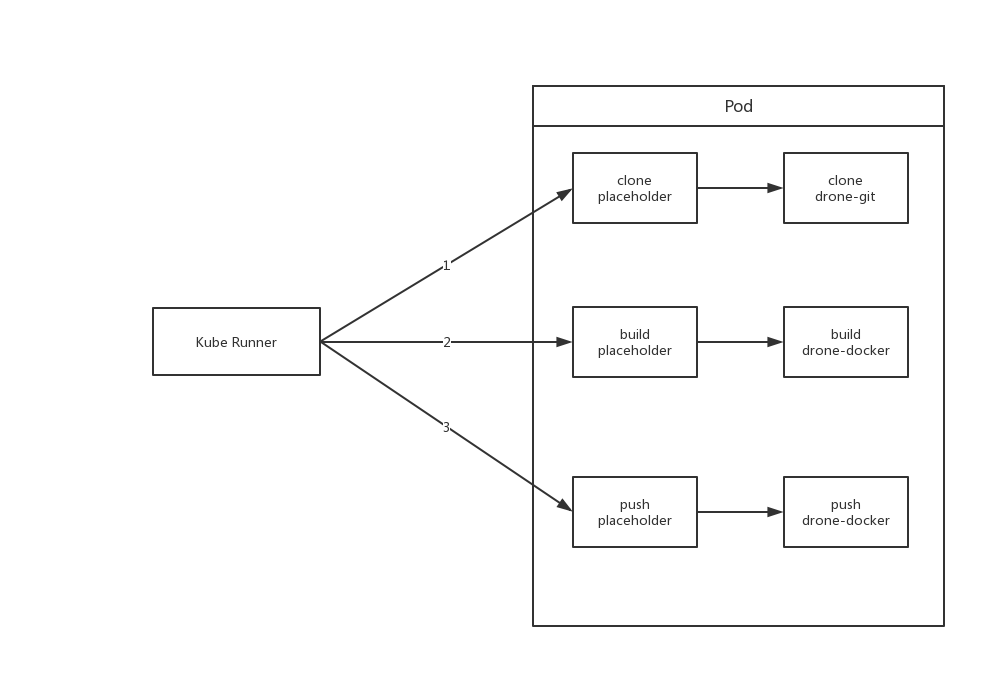
Because all Steps are in one Pod, their data can be shared using EmptyDir. This solves the previous HostPath compatibility problem.
Privileged Context
When executing CI, an important step is to build images. Take docker as an example. Building images using docker typically requires Docker Daemon. Docker Daemon can use the one on the host machine or start a Docker Daemon inside the Container. This forms two different modes, namely Docker Outside Docker and Docker In Docker.
Because Docker Outside Docker requires mounting host files, naturally it cannot be used in this situation. And Docker In Docker because it needs to start Docker Daemon inside the container, it requires Privileged permission. Unfortunately, currently ECI does not support Container using Privileged Context. So both methods cannot effectively build images in the current situation.
So how to solve this problem?
- Expose the docker.sock of a host via TCP through a service, and then access Docker Daemon via TCP.
- Use Kaniko to build images.
Here, we chose kaniko as the build tool.
Kaniko

Kaniko is a tool to build container images from a Dockerfile, inside a container or Kubernetes cluster. It does not depend on a Docker daemon and executes each command within a Dockerfile completely in userspace. This enables building container images in environments that can't easily or securely run a Docker daemon, such as a standard Kubernetes cluster.
Kaniko executor first parses the base image according to the FROM command line in Dockerfile. It executes each line of command in the order in Dockerfile. After executing each command, it generates a snapshot of the file system in user directory space, and compares it with the previous state stored in memory. If there is a change, it considers it as a modification to the base image, adds and expands the file system in the form of a new layer, and writes the modification into the metadata of the image. After executing every instruction in Dockerfile, Kaniko executor pushes the final image file to the specified image repository.
Kaniko can completely execute a series of operations such as unpacking file system, executing build commands and generating file system snapshots in user space in an environment without ROOT permission. The above building process completely does not introduce docker daemon and CLI operations.
At this point, the image building problem is also solved. Next, the entire build can be scheduled to ECI.
Problems encountered in the actual process
Although a lot of things have been done above for the goal of Drone's compatibility with ECI, it is only theoretical. In actual operation, many problems were still encountered.
Because Drone needs to continuously Update Pod when executing a build, and it seems that ECI's Update mechanism is not very perfect at present, many problems occurred during the Update process.
- When Updating,
Environmentof all Pods are lost.
```bash
k exec -it -n beta nginx env PATH=/usr/local/sbin:/usr/local/bin:/usr/sbin:/usr/bin:/sbin:/bin NGINX_VERSION=1.17.5 NJS_VERSION=0.3.6 PKG_RELEASE=1~buster KUBERNETES_PORT_443_TCP_PROTO=tcp KUBERNETES_PORT_443_TCP_ADDR=172.21.0.1 KUBERNETES_PORT_443_TCP_PORT=443 KUBERNETES_PORT_443_TCP=tcp://172.21.0.1:443 KUBERNETES_SERVICE_HOST=172.21.0.1 TESTHELLO=test KUBERNETES_SERVICE_PORT_HTTPS=443 KUBERNETES_SERVICE_PORT=443 KUBERNETES_PORT=tcp://172.21.0.1:443 TERM=xterm HOME=/root
k edit pod -n beta nginx pod/nginx edited
k exec -it -n beta nginx env PATH=/usr/local/sbin:/usr/local/bin:/usr/sbin:/usr/bin:/sbin:/bin TERM=xterm HOME=/root ```
-
The number of Environment in each Container in Pod cannot exceed 92. Because Drone saves key information of each Step execution in Env, causing each Container to need to contain a large number of Envs, thus
ExceedParamErroroccurred when scheduling Pod to ECI. -
Files in EmptyDir will be lost during Pod Update. Drone shares files obtained or modified in each step through EmptyDir. EmptyDir loss leads to CI failure.
-
When Pod Update a certain
Image, K8S shows Pod update successful, but ECI interface returns failure.
bash
   Normal   SuccessfulMountVolume  2m5s                 kubelet, eci                    MountVolume.SetUp succeeded for volume "drone-dggd12eq2mlm5zeevff9"
   Normal   SuccessfulMountVolume  2m5s                 kubelet, eci                    MountVolume.SetUp succeeded for volume "drone-sw7d8bri9rpn0tjr90bp"
   Normal   SuccessfulMountVolume  2m5s                 kubelet, eci                    MountVolume.SetUp succeeded for volume "default-token-l6jsc"
   Normal   Started                2m4s (x4 over 2m4s)  kubelet, eci                    Started container
   Normal   Pulled                 2m4s                 kubelet, eci                    Container image "registry-vpc.cn-hangzhou.aliyuncs.com/drone-git:latest" already present on machine
   Normal   Created                2m4s (x4 over 2m4s)  kubelet, eci                    Created container
   Normal   Pulled                 2m4s (x3 over 2m4s)  kubelet, eci                    Container image "drone/placeholder:1" already present on machine
   Warning  ProviderInvokeFailed   104s                 virtual-kubelet/pod-controller  SDK.ServerError
   ErrorCode: UnknownError
   Recommend:
   RequestId: 94D6A5E0-9F90-47EF-99E9-64DFAE37XXXX
- The strategy of Pod Update in ECI is inconsistent with that in K8S. When Updating Pod in K8S, it only Kills the changed Container and replaces it. While on ECI, it kills all running Containers and replaces them.
bash
   Type    Reason                 Age                 From          Message
   ----    ------                 ----                ----          -------
   Normal  Pulling                111s                kubelet, eci  pulling image "nginx"
   Normal  Pulled                 102s                kubelet, eci  Successfully pulled image "nginx"
   Normal  Pulling                101s                kubelet, eci  pulling image "redis"
   Normal  Pulled                 97s                 kubelet, eci  Successfully pulled image "redis"
   Normal  SuccessfulMountVolume  69s (x2 over 112s)  kubelet, eci  MountVolume.SetUp succeeded for volume "test-volume"
   Normal  Killing                69s                 kubelet, eci  Killing container with id containerd://image-2:Need to kill Pod
   Normal  Killing                69s                 kubelet, eci  Killing container with id containerd://image-3:Need to kill Pod
   Normal  Pulled                 69s (x2 over 111s)  kubelet, eci  Container image "busybox" already present on machine
   Normal  SuccessfulMountVolume  69s (x2 over 112s)  kubelet, eci  MountVolume.SetUp succeeded for volume "default-token-l6jsc"
   Normal  Pulling                68s                 kubelet, eci  pulling image "mongo"
   Normal  Started                46s (x5 over 111s)  kubelet, eci  Started container
   Normal  Created                46s (x5 over 111s)  kubelet, eci  Created container
   Normal  Pulled                 46s                 kubelet, eci  Successfully pulled image "mongo"
It feels like its update method is to delete the Pod and recreate it. Here only image-2 was updated, but it also Killed image-3, and re-Pulled the image of image-1.
Although the above problems were partially fixed after we reported them to Alibaba Cloud, Drone needs to perform Update Pod operation for every step executed, which is a huge cost for ECI.
So I thought if I could change the execution way of Kube Runner to optimize the entire CI execution process.
ps: Still have to change the code...
In drone-runner-eci, I avoid the huge overhead of Pod Update by determining all images when CI starts, and then Attaching to the container to execute Commands when executing each Step.
But doing so requires that each Image must have a shell. Fortunately, our configuration is centrally managed, so it is quite convenient to change.
During actual execution, an awkward problem was still encountered. That is, the Pod Spec is too large (each Step has about 100+ Envs, and there are about 10+ Steps). When virtual kubelet submits creation request to Alibaba Cloud ECI, it was rejected by Alibaba Cloud's gateway, returning 414....
So I could only continue to optimize. Because most Envs in Pod are the same, I merged them into Pod Annotations, then mapped Pod Annotations to files via DownwardAPI, and exported them as environment variables before executing each Step.
I'm too difficult
Thus Pod Spec instantly reduced a lot, solving the above 414 problem.
Currently drone-runner-eci is running stably in our production environment. Friends who want to experience elastic CI can also try it.
Continuous Optimization
After solving the problems mentioned above, Drone can run on ECI. But there is still a lot of room for optimization.
Image Pulling
Unlike creating Pods on host machines, image cache on host machines can be used each time. Creating Pods on ECI requires pulling images each time, which slows down the build speed. To solve this phenomenon, Alibaba Cloud also provides a solution imagecache.
imagecache allows users to cache images that need to be used as cloud disk snapshots in advance, and create ECI container group instances based on snapshots when creating them, avoiding or reducing image layer downloads, thereby improving the creation speed of ECI container group instances.
Resource Optimization
ECI provides a huge convenience for Drone, that is, there is no need to set resources for each Container when limiting running resources.
For example, there are two Steps (Containers), each needing 1vCPU and 1Gi Mem. Scheduling this Pod requires more than 2vCPU and 2Gi Mem resources on the node. But because most of the time CI build tasks are serial, these two Steps do not need to execute at the same time, meaning in this scenario actually only 1vCPU and 1Gi Mem are enough. The situation above causes resource waste, but there is no good way to solve this problem on host machines. However, in ECI, each Pod will exclusively occupy one ECI instance, so all Containers in all Pods can enjoy the full configuration of ECI.
This resource allocation method and resource size can be specified via Pod Annotations:
annotations:
  k8s.aliyun.com/eci-cpu: 1
  k8s.aliyun.com/eci-memory: 1Gi
This way the Pod can stably run two Steps in an ECI instance with 1vCPU and 1Gi Mem.
Summary
In general, Virtual Kubelet may be one of the best elastic CI solutions currently. (ps: ECI product documentation also includes Best Practices for Jenkins and Gitlab CI)