This article is just a casual note, only describing the process, not the principles.
Executing kubectl run
Api Server
-
Local validation to ensure that invalid requests (such as creating unsupported resources or incorrect formats, etc.) fail quickly and are not sent to the api-server, reducing server pressure.
-
Prepare to send an HTTP request to the api-server, serializing the modified data. But what is the URI PATH? Here it depends on the
apiVersionwithin the resource, plus the resource type, sokubectlcan find the address to send to in the api list. The api list can be obtained via the/apisURL of the api-server, and after obtaining it, it will be cached locally to improve efficiency. -
The api-server will certainly not accept invalid requests, so
kubectlmust set up authentication information before the request. Authentication information can generally be obtained from~/.kube/config, which supports 4 types. - tls: Requires x509 certificate
- token: Add Authorization in HEADER
- basic username password: Basic account password authentication
-
openid: Similar to token, openid is manually set by the user in advance
-
At this point, the api-server has successfully received the request. It will determine if we have permission to operate on this resource. So how to verify? When the api-server starts, it can be set through the parameter
--authorization_mode, which has 4 values. - webhook: Interact with HTTPS services outside the cluster
- ABAC: Policies defined by static files
- RBAC: Policies configured dynamically
- Node: Each kubelet can only access resources on its own node
If multiple authorization methods are configured, the request can continue as long as one of them passes.
- Authorization passed, but data still cannot be written to etcd yet, it still needs to pass the
Admission Control Chainhurdle. The admission control chain is controlled byAdmission Controller. There are nearly 10 standard admission control chains, and custom extensions are supported. Unlike authorization, checking allows the request to continue as long as one passes, using admission control chain, once a verification fails, the request will be rejected. The following introduces three admission controllers. - SecurityContextDeny: Forbid creating Pods with Security Context set
- ResourceQuota: Limit total system resource usage and resource quantity under a certain Namespace
-
LimitRanger: Limit single resource usage under a certain Namespace
-
After passing all the above verifications, the api-server deserializes the data submitted by kubectl and then saves it to etcd.
InitializerConfiguration
- Although the data has been persisted to etcd, the apiserver cannot fully see or schedule it yet. Before that, a series of
Initializersmust be executed.Initializerswill execute certain logic before the resource is available externally. For example,injecting Sidecarinto Pods exposing port 80, or adding specificannotation, etc. TheInitializerConfigurationresource object allows you to declare which Initializers needs to run for certain resource types.
Controller
-
Data has been saved to etcd, and initialization logic is also completed. Next, the
Controllerin k8s is needed to complete the creation of resources. Each Controller will monitor the resources it is responsible for, for example,Deployment Controllerwill monitor the changes ofDeploymentresources. When the api-server saves the resource to etcd, the Controller discovers the change of the resource, and then calls the corresponding callback function according to the change type. Each Controller will try its best to gradually convert the current state of the resource to the state saved in etcd. -
After all Controllers run normally, etcd will save a Deployment, a ReplicaSet and three Pod resource records, which can be viewed through kube-apiserver. However, these Pod resources are still in Pending state because they have not been scheduled to run on suitable Nodes in the cluster. This problem eventually needs to be solved by the scheduler (
Scheduler).
Scheduler
-
Scheduler will bind the pending Pod to a suitable Node in the cluster according to specific algorithms and scheduling strategies, and write the binding information into etcd (it will filter Pods whose NodeName field in PodSpec is empty).
-
Once the Scheduler finds a suitable node, it creates a
Bindingobject whoseNameandUidmatch the Pod, and itsObjectReferencefield contains the name of the selected node, and then sends it to the apiserver via a POST request. -
When kube-apiserver receives this Binding object, it updates the following fields in the Pod resource:
-
Set the value of
NodeNameto theNodeNameinObjectReference. -
Add relevant annotations.
-
Set the
statusofPodScheduledtoTrue.
Kubelet
In a Kubernetes cluster, a Kubelet service process starts on each Node node. This process handles tasks dispatched by the Scheduler to this node, manages the lifecycle of Pods, including volume mounting, container logging, garbage collection, and other events related to Pods.
- Every 20s, Kubelet will query the api-server via
NodeNameto get the list of Pods to run on its own Node. After getting the data, it compares it with its internal cache to get the list of Pods with differences. And start synchronizing these Pods. -
Record Pod startup related
Metrics -
Generate a
PodStatusobject, which represents the current phase status of the Pod. The value of PodStatus depends on: 1.PodSyncHandlerschecks if the Pod should run on the Node, if not,PodStatuswill havePhaseturn intoPodFailed. 2. Next, PodStatus will be determined by the status ofinit containerandapp container. -
After generating PodStatus (status field in Pod), Kubelet sends it to the Pod status manager, whose task is to asynchronously update the records in etcd via apiserver.
-
Next, run a series of admission handlers to ensure whether the Pod has the corresponding permissions. Pods rejected by the admission controller will remain in Pending state.
-
If Kubelet is started with the
cgroups-per-qosparameter specified, Kubelet will create cgroups for the Pod and perform corresponding resource limits. This is to facilitate Quality of Service (QoS) management for Pods. -
Then create corresponding directories for the Pod, including the Pod directory (
/var/run/kubelet/pods/<podID>), the Pod's volume directory (<podDir>/volumes) and the Pod's plugin directory (<podDir>/plugins). -
The volume manager will mount relevant data volumes defined in
Spec.Volumes, and then wait for whether the mount is successful. Depending on the mount volume type, certain Pods may need to wait longer (such as NFS volumes). -
Retrieve all Secrets defined in
Spec.ImagePullSecretsfrom apiserver, and then inject them into the container.
CRI
- After the above steps, a large amount of initialization work has been completed, and the container is ready to start. Kubelet interacts with the container runtime (default is
Docker) through the Container Runtime Interface. When starting a Pod for the first time, Kubelet will create asandbox. As the base container for all containers in the Pod, the sandbox provides a large amount of Pod-level resources for each business container in the Pod. These resources are Linux namespaces (including network namespace, IPC namespace and PID namespace).
CNI
- Next, Kubelet creates a network environment for the Pod to ensure communication between
Pod and Pod,Pod and Serviceacross hosts. When Kubelet creates a network for a Pod, it delegates the task of creating the network to theCNIplugin. CNI stands for Container Network Interface, similar to how container runtimes run, it is also an abstraction that allows different network providers to provide different network implementations for containers. Different CNI plugins work differently, please refer to corresponding articles.
Starting Container
After all networks are configured, the business container starts to run for real!
-
Once the
sandboxcompletes initialization and is in active state, Kubelet can start creating containers for it. First start the init container defined inPodSpec, and then start the business container. -
First pull the image of the container. If it is an image from a private repository, the
Secretspecified inPodSpecwill be used to pull the image. -
Then create the container via the
CRIinterface.Kubeletfills aContainerConfigdata structure (defining command, image, labels, mounted volumes, devices, environment variables, etc.) intoPodSpec, and sends it to the CRI interface via protobufs. For Docker, it deserializes this information and fills it into its own configuration information, and then sends it to the Dockerd daemon. In this process, it adds some metadata tags (such as container type, log path, sandbox ID, etc.) to the container. -
Next, use the
CPUmanager to constrain the container. This is a new alpha feature added in Kubelet 1.8. It uses theUpdateContainerResources CRImethod to allocate the container to the CPU resource pool on this node.
Finally, the container starts running for real.
If a container lifecycle hook (Hook) is configured in the Pod, these Hooks will run after the container starts. Hook types include two: Exec (execute a command) and HTTP (send an HTTP request). If the PostStart Hook takes too long to start, hangs, or fails, the container will never become running state.
Summary
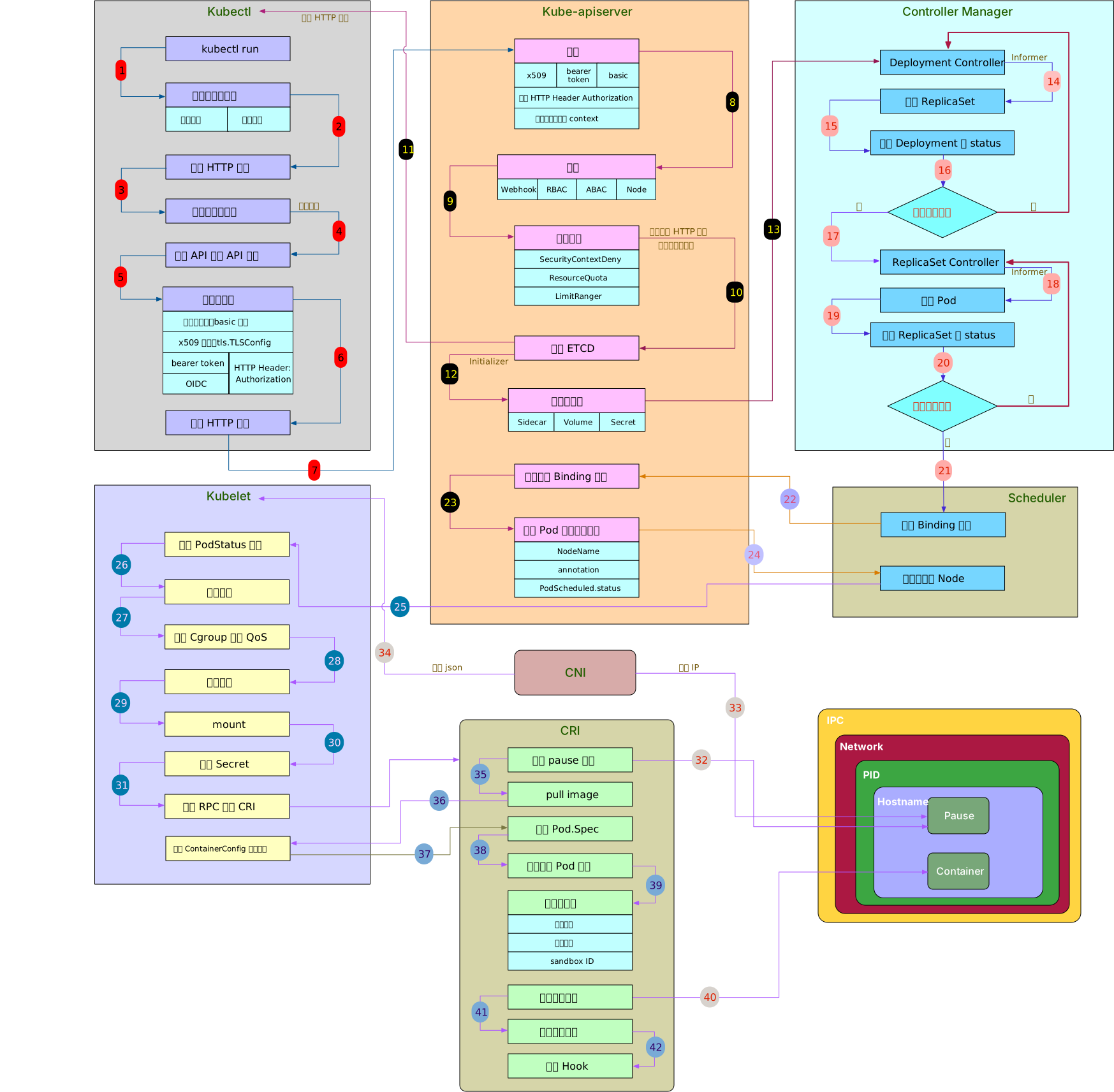
The flowchart of the entire process of creating a Pod described above is shown below:
Reference: