This article is based on Cilium 1.10
This article will share some knowledge about Cilium, covering the following main parts:
- Basics of eBPF
- Application of eBPF in Cilium
- Usage of some Features in Cilium
- How to do TroubleShooting in Cilium
Of course, before diving into eBPF and Cilium, I will briefly introduce some basic knowledge:
- How Linux receives data packets in the traditional network protocol stack
- How networks communicate in CNI
Now let's start the main content of this article.
Linux Packet Processing Process
Receiving
Here is a brief introduction to the process of receiving data packets, that is, how data packets are sent from the network to the kernel protocol stack.
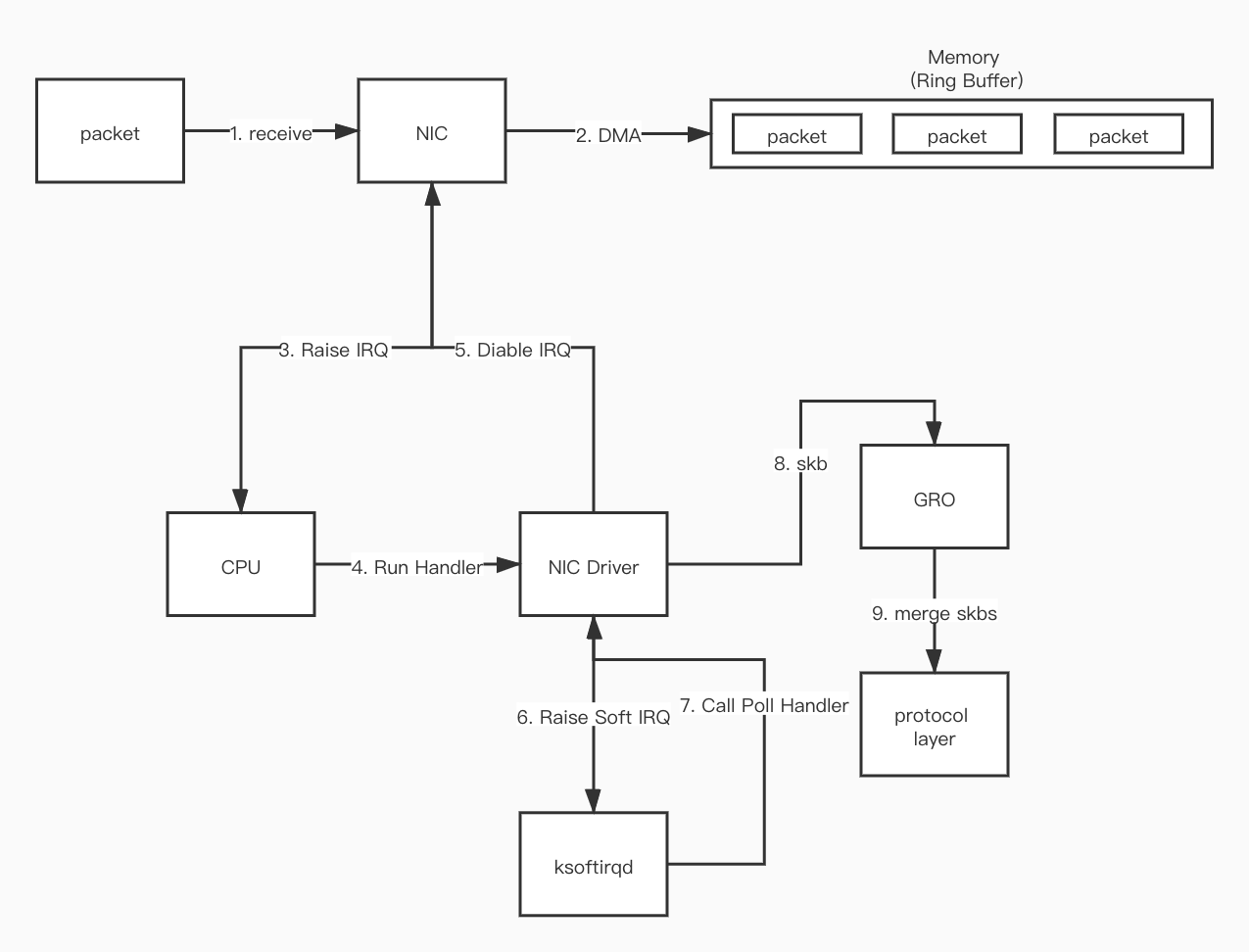
- First, when the data packet arrives at the network interface card (NIC) from the network.
- The data packet is copied (via DMA) to the ring buffer in kernel memory.
- The NIC generates a hardware interrupt (IRQ) to let the CPU know that the data packet is in memory.
- The CPU finds and calls the corresponding function in the NIC Driver based on the registered interrupt function.
- The NIC Driver will disable hardware interrupts. After that, when data packets continue to arrive at the NIC, the NIC will write the data packets directly to memory without generating hardware interrupts anymore.
- The NIC Driver starts a soft interrupt (Soft IRQ), letting the
ksoftirqdprocess in the kernel call the poll function in the Driver to read the data DMA-ed by the NIC into memory. - The data read is converted into
skbformat (the format specified by the kernel) through the function in the Driver. - GRO merges multiple
skbs into an skb of the same size. - The
skbdata is processed into the protocol layer format by functions related to the protocol stack. - After all data packets in memory are processed, the NIC Driver enables the NIC's hardware interrupt.
Sending
- After the data packet is encapsulated into
skbby the network protocol stack, it will be placed in the sending queue of the network card. - The kernel notifies the network card to send the data packet.
- After the network card finishes sending, it sends an interrupt to the CPU.
- After receiving the interrupt, the CPU performs the cleanup work of skb.
Network Communication in CNI
Here is a brief introduction to how Pods communicate with each other in Kubernetes. In K8S, there are two situations for communication between Pods: Same-node Pod communication and Cross-node Pod communication.
Before discussing Pod-to-Pod communication, let's first understand how Pod data packets are sent to the Host node.
Pod in Kubernetes refers to a group of Containers. Container technology essentially uses Linux Namespace technology. All Containers in a Pod share the same Namespace to achieve network sharing between them and isolation from external networks.
However, Containers isolated by the network always have a need to access other services, so the data packets they send must be able to reach the outside. To meet this requirement, there are certainly many solutions, such as attaching a physical network card or a virtual network card to the Namespace.
But here mainly introduces the solution adopted by most CNIs, which is veth-pair.
veth-pair
veth-pair is a pair of virtual device interfaces. They always appear in pairs, connected to each other at both ends. Data sent from one end will be received by the other end. Because of this feature, it often acts as a bridge connecting various virtual network devices.
If you want the services in the Namespace to be able to send data packets to the outside, you can create a pair of veth-pair, put one end in the Namespace and the other end in the Host. In this way, when the service in the Namespace sends a packet, the packet will be sent to the Root Namespace (Host), so the Host can forward the packet to the target service according to the routing rules in the route table.
Of course, the above paragraph is just an ideal situation. In fact, there are many things that have not been considered, such as the four elements of network communication: src_ip, src_mac, dst_ip, and dst_mac. Without these four kinds of information, data packets naturally cannot be delivered to the destination. In the above scenario, src_ip (the ip of the veth-pair network card attached in the Namespace), src_mac (same as above), and dst_ip are all known, so the next question is how to get dst_mac.
In network communication,
dst_macrefers to the address of the nextHop. If it goes through L3 forwarding, then dst_mac is the gateway address. If it goes through L2 switching,dst_macis the destination address.
Same-node Pod Communication
As mentioned above, the problem of communication between Pods on the same node is how to solve the dst_mac problem.
Different CNIs have different solutions.
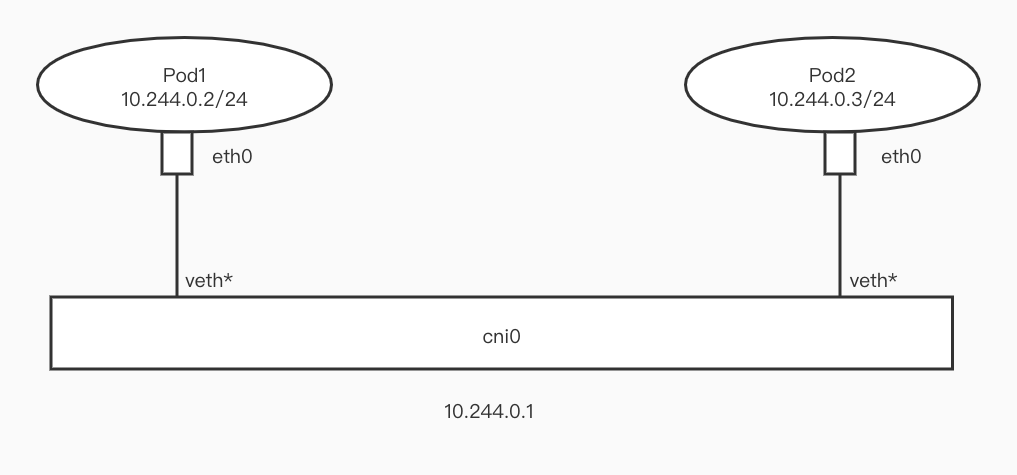
For example, in Flannel, Flannel creates a NetworkBridge (cni0) on the Host, then sets the Pod's IP to 24 bits, attaches one end of veth-pair to the Pod, and attaches the other end to cni0. Because Pods on the same node are all 24-bit IPs, communication between Pods goes through Layer 2 switching. The src Pod can obtain the mac address of the dst Pod through arp requests, thus solving the problem of dst_mac.
NetworkBridge can be seen as a virtual switch. Devices attached to the network bridge can communicate with each other.
But this article will mainly introduce another mode (all subsequent content is also based on this mode), which is also used in Calico or Cilium.
In Calico or Cilium, the Pod's IP is set to 32 bits. Therefore, in this case, Pod access to any other IP goes through L3 routing.
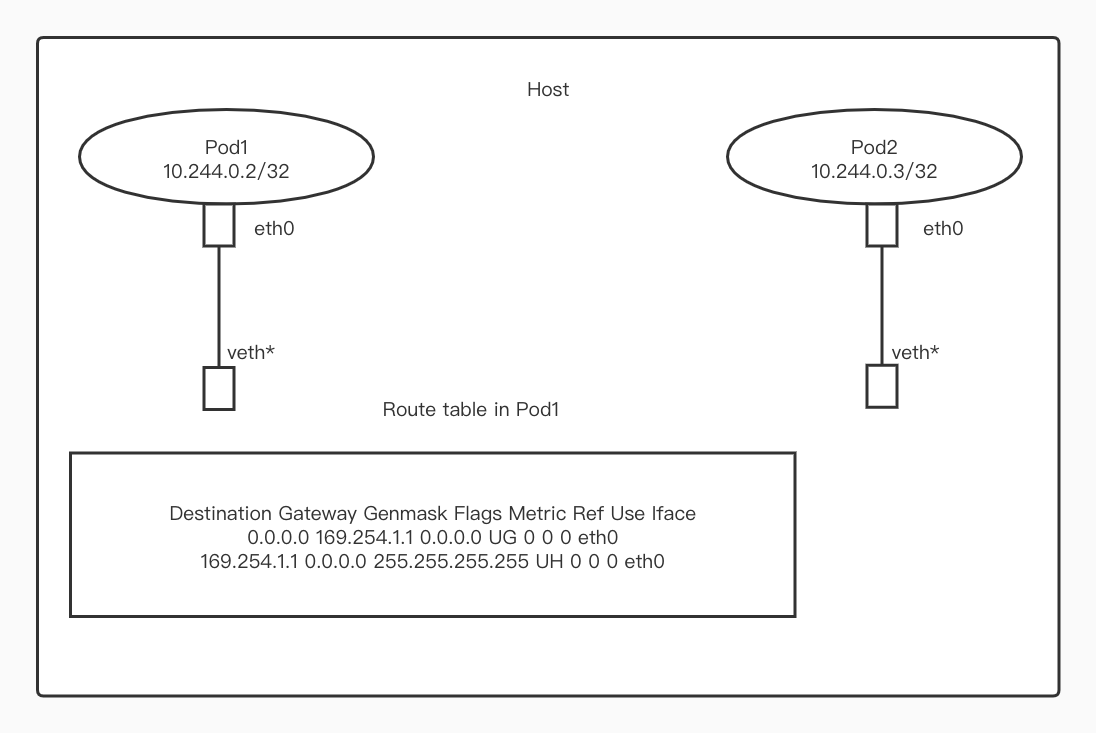
The above is data I obtained from a kubernetes cluster, where the cni is Calico.
From the routing table in the Pod, we can see that the default gateway address is 169.254.1.1. Therefore, if you want to access other services from Pod1, you need to first obtain the mac address of 169.254.1.1, but obviously this mac address cannot be obtained through arp requests.
So how to solve this problem? In fact, Calico and Cilium adopted different solutions.
Calico
Calico solves it by using proxy_arp. Simply put, a network device with proxy_arp enabled can be treated as an arp gateway. When it receives an arp request, it replies with its own mac address to the requester. Because of the veth-pair, requests sent by eth0 in the Pod will be sent to the veth* bound to it.
Therefore, after enabling proxy_arp for this veth*, veth* can reply its mac to the Pod, so that data packets can be sent out. After the data packet is sent to the Host, according to the local routing table in the Host, the data packet is sent to the veth-pair device corresponding to the Pod mounted on the Host.
Cilium
Cilium's approach is to attach a tc ingress bpf program on veth* to return the mac of veth* for all arp requests of the Pod.
Cross-node Pod Communication
This article will not focus on technologies used in cross-node communication, such as Overlay or Underlay.
And Cilium focuses on solving problems not in this area, and Cilium uses very mainstream technologies in solving cross-node transmission problems, such as VxLan or BGP, so I won't expand on it here.
If you are interested in this part, I recommend you to read the documentation of Calico on this part.
eBPF Basics
After finishing the above foundation, let's introduce the protagonist of this time, eBPF.
Currently, BPF technology is divided into two types, cBPF and eBPF.
cBPF was born in 1997, kernel version 2.1.75. It uses a primitive interface on the data link layer on Unix-like systems, providing sending and receiving of original link layer packets. The underlying layer of tcpdump uses cBPF as the underlying packet filtering technology.
eBPF was born in 2014, kernel version 3.18. The new design of eBPF is optimized for modern hardware, so the instruction set generated by eBPF executes faster than the machine code generated by the old BPF interpreter.
cBPF is now basically obsolete. Currently, the kernel only runs eBPF. The kernel will transparently convert the loaded cBPF bytecode into eBPF and execute it (hereinafter BPF refers to eBPF).
BPF has the following advantages:
- Run sandbox programs in the kernel without modifying kernel source code or loading kernel modules. After making the Linux kernel programmable, more intelligent and feature-rich infrastructure software can be built based on existing (rather than adding new) abstraction layers without increasing system complexity or sacrificing execution efficiency and security.
- It can be hot restarted, and the kernel helps manage the state. Under the premise of not causing traffic interruption, it atomically replaces the running program.
- Kernel native, no need to import third-party kernel modules.
- Safety, the kernel checks the BPF program to ensure it does not cause a kernel crash.
At the same time, BPF has the following characteristics:
- BPF map: efficient kv storage.
- Helper functions: can conveniently use kernel functions or interact with the kernel.
- Tail calls: efficiently call other BPF programs.
- Security hardening primitives.
- Support object pinning to achieve persistent storage.
- Support offload to network card.
Next, these features will be introduced.
BPF Map
In order to allow BPF to persist state, the kernel provides efficient kv storage (BPF map) residing in kernel space. BPF maps can be accessed by BPF programs, shared between multiple BPF programs (shared programs do not necessarily require the same type), and can also be accessed by user space programs in the form of fd. Therefore, user programs can use fd-related APIs to easily operate maps.
Shared programs do not necessarily require the same type means: tracing programs can also share maps with networking programs.
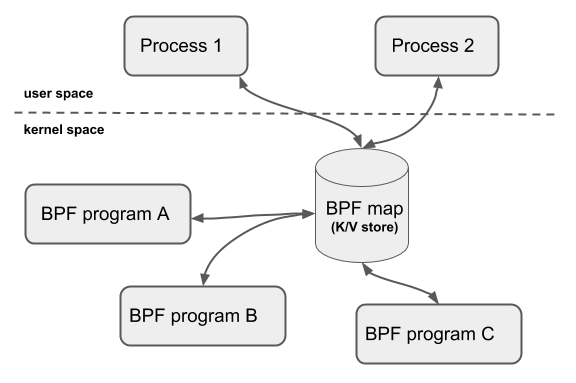
However, fd is affected by the life cycle of the process, making operations such as map sharing complicated. To solve this problem, the kernel developed the object pinning function, which can retain the fd of the map and will not be deleted as the process exits.
Helper Functions
Enables BPF to query data from the kernel or push data to the kernel through a set of kernel-defined function calls.
Different types of BPF programs may use different helper functions.
Tail Calls
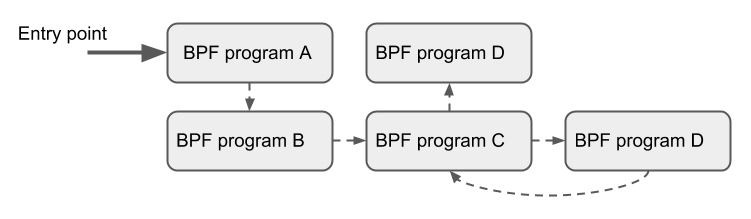
BPF supports a BPF program calling another BPF program, and there is no need to return to the original program after the call is completed (only BPF programs of the same type can be tail called).
Compared with ordinary function calls, this calling method has minimal overhead because it is implemented using long jumps (longjump) and reuses the original stack frame.
Usage scenarios:
- Can structurally parse network headers through tail calls.
- Atomically add or replace functions at runtime, that is, dynamically change the execution behavior of BPF programs.
Offload
BPF network programs, especially tc and XDP BPF programs, have an interface in the kernel to offload to hardware, so that BPF programs can be executed directly on the network card.
This article will next discuss two BPF subsystems widely used in Cilium, XDP and tc subsystem.
XDP
XDP provides a high-performance, programmable network data path for the Linux kernel.
The XDP hook is located on the fast path of the network driver. The XDP program takes the packet directly from the receive buffer. At this time, the Driver has not converted the data packet into skb, so the meta information of the data packet has not been parsed out. Theoretically, this is the earliest software layer position where packets can be processed.
At the same time, because the XDP hook runs on the fast path of the network driver, running XDP BPF programs requires support from the network driver.
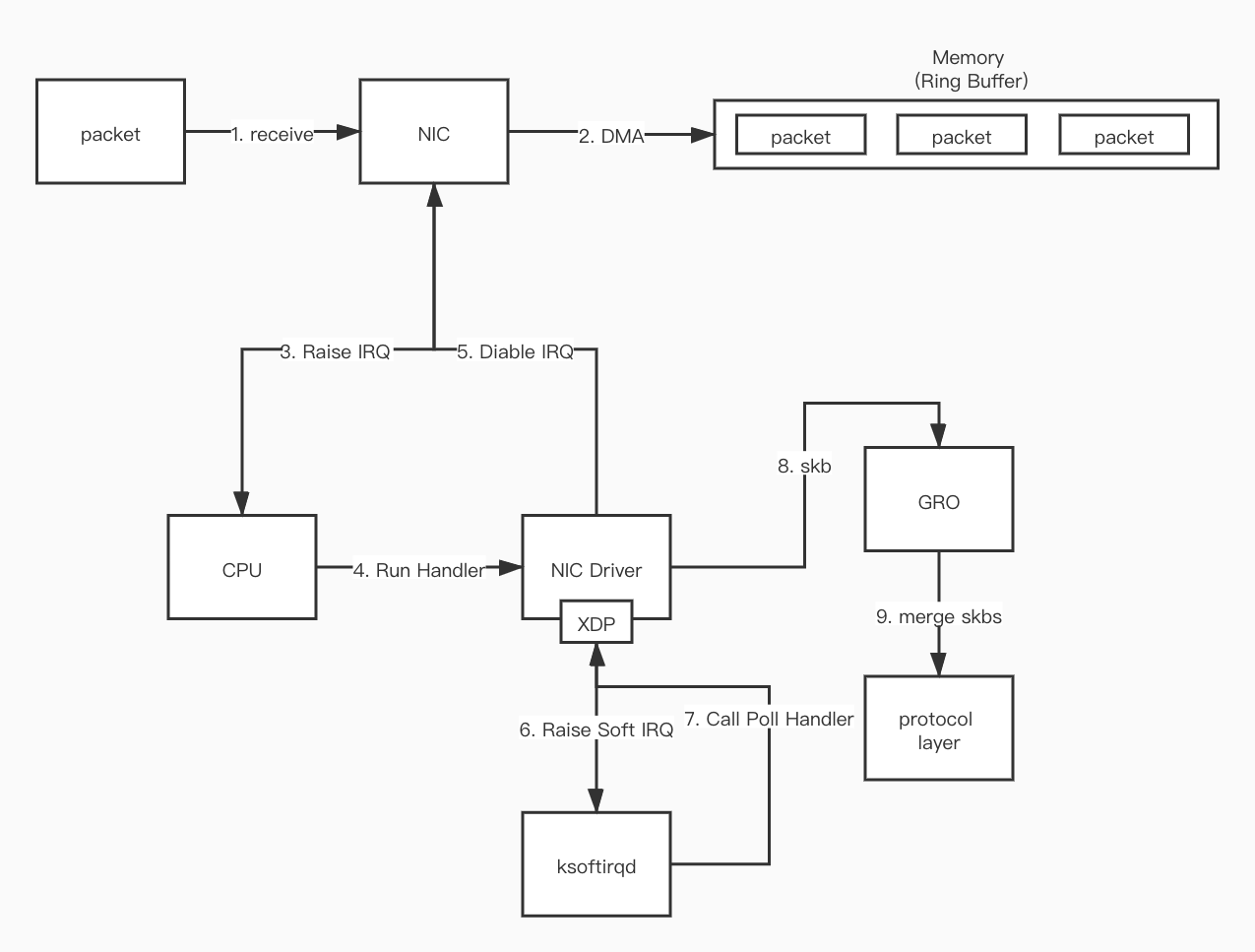
xdp program will be executed between step 7 and step 8.
Also XDP runs in kernel mode and does not bypass the kernel, which brings the following benefits:
- It can reuse all upstream developed kernel network drivers, user space tools, and other kernel infrastructure (such as BPF helper functions can use system routing tables, sockets, etc. when calling themselves).
- XDP has the same security model as the rest of the kernel when accessing hardware.
- No need to cross kernel and user space.
- Can reuse the TCP/IP protocol stack.
- No need to explicitly allocate a dedicated CPU to XDP, it can support
pollingorinterrupt drivenmodes.
XDP BPF programs can modify the content of data packets. At the same time, XDP provides 256 bytes of headroom for each data packet. XDP BPF programs can modify this part, such as adding custom metadata in front of the data packet. This part of data is invisible to the kernel protocol stack, but visible to the tc BPF program.
struct xdp_buff {
    void *data;
    void *data_end;
    void *data_meta;
    void *data_hard_start;
    struct xdp_rxq_info *rxq;
};
This structure is the format of the data packet obtained by the XDP program.
data: Points to the start of the data packet.data_end: Points to the end of the data packet.data_hard_start: Points to the start of the hardroom.data_meta: Points to the start ofmetainformation. Initiallydata_metais essentially the same asdata. As meta information increases,data_metastarts to move closer todata_hard_start.rxq: Field points to some extra metadata related to each receive queue.
From the above, we can derive the structure of xdp_buff
data_hard_start |___| data_meta |___| data |___| data_end
And the relationship between these data fields
data_hard_start <= data_meta <= data < data_end
XDP BPF Program Return Code
After the XDP BPF program finishes running, it returns a status code telling the driver how to handle the packet.
XDP_DROP: Discard the packet at the Driver layer.XDP_PASS: Send this packet to the kernel network protocol stack. This is the same as the default packet processing behavior without XDP.XDP_TX: Send the packet out again on the network card receiving the packet (the packet is generally modified).XDP_REDIRECT: Similar toXDP_TX, but send the packet out on another network card.XDP_ABORTED: Indicates that the program has an exception, the behavior is consistent with XDP_DROP, but it will go through the trace_xdp_exception tracepoint, and this abnormal behavior can be monitored by tracing tools.
XDP Use Cases
DDoS defense, firewall: Thanks to XDP being able to get the data packet at the earliest position, and then use theXDP_DROPcommand to drive the packet discard, XDP can implement very efficient firewall policies, which is ideal for DDoS attack scenarios.Forwarding and load balancing: Implemented through two actions:XDP_TXandXDP_REDIRECT.XDP_TXcan implement load balancers in hairpin mode.Pre-stack filtering/processing: Traffic that does not meet requirements can be discarded as early as possible usingXDP_DROP. For example, if a node only accepts TCP traffic, UDP requests can be directly discarded. At the same time, XDP can modify the content of the data packet before the NIC Driver allocates skb, which is very useful for some Overlay scenarios (need to encapsulate and decapsulate data packets), and XDP can push metadata in front of the data packet, and this part is invisible to the kernel protocol stack.Flow sampling and monitoring: XDP can analyze traffic, and abnormal traffic can be put into BPF map for other processes to analyze.
Some smart network cards (such as network cards supporting Netronome's nfp driver) implement xdpoffload mode, allowing the entire BPF/XDP program to be offloaded to the hardware, so the program is processed directly on the network card when the network card receives the packet. However, in this mode, certain BPF map types and BPF helper functions are not available.
tc
In addition to XDP and other types of programs, BPF can also be used for the tc (traffic control) layer of the kernel data path.
There are three main differences between tc and XDP:
Input Context
Compared to XDP, tc is located later in the traffic path (after skb allocation). Therefore, for tc BPF programs, its input context is sk_buff, not xdp_buff, so tc ingress BPF programs can use the packet metadata processed by the kernel in sk_buff. Of course, handling these metadata by the kernel requires overhead, including buffer allocation performed by the protocol stack, metadata extraction, and other processing processes. while xdp_buff does not need to access these metadata because the XDP hook is called before this, so this is one of the important reasons for the performance gap between XDP and tc hook.
Whether dependent on driver support
Because tc BPF programs run at hook points in the generic layer of the network stack, they do not require any support from the driver.
Trigger point
tc BPF programs can be triggered at both ingress and egress on the data path.
XDP BPF programs can only be triggered at the ingress point.
tc ingress
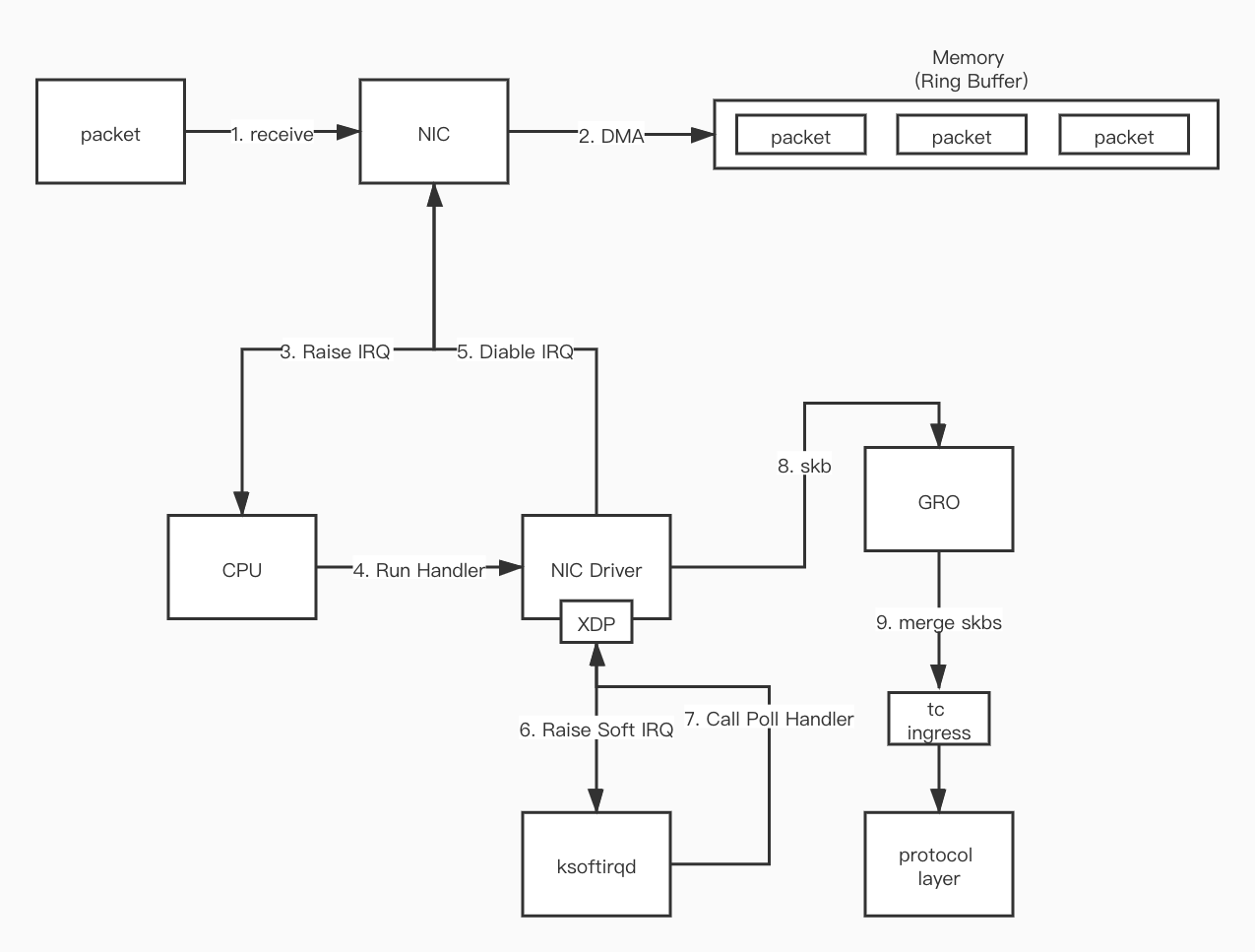
The tc ingress hook is located after GRO and before processing the protocol, which is the earliest processing point.
tc egress
The location where the tc egress hook runs is the latest position before the kernel hands the data packet to the NIC Driver. This place is after the traditional iptables firewall POSTROUTING chain, but before the GSO engine processing.
tc BPF Program Execution Mode
In tc, there are the following 4 types of components
qdisc: Linux queuing discipline, completes functions such as speed limiting and shaping according to certain algorithms.class: User-defined traffic category.classifier: Classifier, classification rule. In the traditional tc scheme, classifier and action modules are separated. Each classifier can attach multiple actions. When this classifier is matched, these actions will be executed. In addition, it can not only read skb metadata and packet data, but also arbitrarily modify both, finally ending the tc processing process and returning a return code.action modules: What action to perform on the packet.
When attaching a tc BPF program to a network device, the following operations need to be performed:
- Create
qdiscfor the network device. - Create
classand attach toqdisc. - Create
filter (classifier)and attach toqdisc. - filter categorizes traffic on network devices and dispatches packets to different classes defined earlier.
- filter will filter each packet and return one of the following values:
0: Means mismatch, if there are other filters behind, continue execution downwards.-1: Execute the defaultclasson this filter.Other: Represents a classid, the system will send the data packet to thisclassnext.
- Add
actiontofilter. - For example, drop the selected packet (drop), or mirror the traffic to another network device, etc.
cls_bpf classifier
cls_bpf is a classifier. Compared with other types of tc classifiers, it has an advantage: it can use the direct-action mode.
Cilium uses the cls_bpf classifier. When deploying the cls_bpf service, it only attaches one program for a given hook point, and uses the direct-action mode.
direction-action
As mentioned above, the execution mode of traditional tc BPF programs is that classifier classification and action modules execution are separated. A classifier attaches multiple actions. The classifier acts as a traffic matcher, and then hands the matched traffic to the action for execution.
But for many scenarios, the eBPF classifier already has enough capabilities to complete task processing without attaching additional qdisc or class.
So, in order to:
- Avoid introducing a functionally thin action due to applying the original tc process.
- Simplify scenarios where the classifier alone can complete all the work.
- Improve performance.
The community introduced a new flag for tc: direct-action, abbreviated as da. This flag is used at the attach time of the filter, telling the system: the return value of the classifier should be interpreted as an action type return value. This means that the loaded eBPF classifier can now return an action code. For example, in a scenario requiring packet drop, there is no need to introduce an answer action execute drop operation, it can be completed directly in the classifier.
Benefits brought by this:
- Performance improvement, because the tc subsystem no longer needs to call additional action modules, which are outside the kernel.
- The program structure is simpler and easier to use.
tc BPF Program Return Code
TC_ACT_UNSPEC: End the processing of the current program and do not specify the next operation (the kernel will perform the next step according to the situation). For the following three cases, the default operations are respectively.- When
cls_bpfis attached with multiple tc BPF programs, continue to the next tc BPF program. - When
cls_bpfis attached with offloaded tc BPF programs (similar to offloaded XDP programs), cls_bpf returnsTC_ACT_UNSPEC, and the kernel will execute the next non-offloaded BPF program (only one program can be offloaded per NIC). - When there is only a single tc BPF program, return this code to notify the kernel to continue executing skb processing without causing other side effects.
TC_ACT_OK: End the processing of the current program and tell the kernel the next tc BPF program to execute.TC_ACT_SHOT: Notify the kernel to discard the data packet and returnNET_XIT_DROPto the caller indicating the packet was dropped.TC_ACT_STOLEN: Notify the kernel to discard the data packet and returnNET_XMIT_SUCCESSto the caller, pretending that the packet was sent correctly.TC_ACT_REDIRECT: Use this return code plus thebpf_redirect()helper function to allow redirecting anskbto the ingress or egress path of the same or another network device. There are no additional requirements for the target network device, as long as it is a network device itself, there is no need to run acls_bpfinstance or other restrictions on the target device.
tc Use Cases
Enforce policy for containers: In container networks, one end of veth-pair is connected to Namespace and the other end is connected to Host. All networks in the container will pass through the veth device on the Host end, so tc ingress and egress hooks can be attached to the veth device. At this time, traffic sent from the container will pass through the tc ingress hook of veth, and traffic entering the container will pass through the tc egress hook of veth (for virtual devices like veth, XDP is not suitable in this scenario because the kernel only operates skb here, and generic XDP has several restrictions leading to inability to operate cloned skb. And XDP cannot handle egress traffic).Forwarding and load balancing: The usage scenario is very similar to XDP, but the target is more often east-west container traffic rather than north-south. tc can also be used in the egress direction, for example, to perform NAT and load balancing on container egress traffic. The entire process is transparent to the container. Since egress traffic is already in the form of sk_buff in the kernel network stack implementation, it is very suitable for tc BPF to rewrite and redirect it. Using the bpf_redirect() helper function, BPF can take over the forwarding logic and push the packet to the ingress or egress path of another network device.Flow sampling and monitoring: tc BPF programs can be attached to ingress and egress at the same time. In addition, these two hooks are at the lower layer of the (general) network stack, which makes it possible to monitor all bidirectional network traffic of each node. Cilium uses the feature that tc BPF can add custom annotations to data packets to mark dropped packets with annotations, marking the container it belongs to and the reason for being dropped, providing rich information.
Cilium and eBPF
The above described how traffic in the Pod is successfully sent to the veth of the Host. Next, let's introduce the complete path of traffic in Cilium.
Current environment based on Legacy Host Routing mode
Before starting, let's observe what will appear when Cilium is installed in the cluster. Here you can directly enter the cilium agent's Pod and execute network commands. Because the agent uses hostNetwork: true, it shares the network with the host, so the network devices viewed in the Pod are the network devices on the host.
$ k exec -it -n kube-system cilium-qv2cb -- ip a
18: cilium_net@cilium_host: <BROADCAST,MULTICAST,NOARP,UP,LOWER_UP> mtu 9001 qdisc noqueue state UP group default qlen 1000
    link/ether fa:f3:f0:8d:5e:ae brd ff:ff:ff:ff:ff:ff
    inet6 fe80::f8f3:f0ff:fe8d:5eae/64 scope link
       valid_lft forever preferred_lft forever
19: cilium_host@cilium_net: <BROADCAST,MULTICAST,NOARP,UP,LOWER_UP> mtu 9001 qdisc noqueue state UP group default qlen 1000
    link/ether 3e:87:e2:f3:58:47 brd ff:ff:ff:ff:ff:ff
    inet 10.0.1.118/32 scope link cilium_host
       valid_lft forever preferred_lft forever
    inet6 fe80::3c87:e2ff:fef3:5847/64 scope link
       valid_lft forever preferred_lft forever
$ k exec -it -n kube-system cilium-qv2cb -- iptables -L
Chain CILIUM_FORWARD (1 references)
target     prot opt source               destination
ACCEPT     all  --  anywhere             anywhere             /* cilium: any->cluster on cilium_host forward accept */
ACCEPT     all  --  anywhere             anywhere             /* cilium: cluster->any on cilium_host forward accept (nodeport) */
ACCEPT     all  --  anywhere             anywhere             /* cilium: cluster->any on lxc+ forward accept */
ACCEPT     all  --  anywhere             anywhere             /* cilium: cluster->any on cilium_net forward accept (nodeport) */

Chain CILIUM_INPUT (1 references)
target     prot opt source               destination
ACCEPT     all  --  anywhere             anywhere             mark match 0x200/0xf00 /* cilium: ACCEPT for proxy traffic */

Chain CILIUM_OUTPUT (1 references)
target     prot opt source               destination
ACCEPT     all  --  anywhere             anywhere             mark match 0xa00/0xfffffeff /* cilium: ACCEPT for proxy return traffic */
MARK       all  --  anywhere             anywhere             mark match ! 0xe00/0xf00 mark match ! 0xd00/0xf00 mark match ! 0xa00/0xe00 /* cilium: host->any mark as from host */ MARK xset 0xc00/0xf00
You can see 2 network devices cilium_host and cilium_net appear (if overlay mode is used, there will be cilium_vxlan), and 3 iptables rules CILIUM_FORWARD, CILIUM_INPUT and CILIUM_OUTPUT.
cilium_host and cilium_net
cilium_host and cilium_net are a pair of veth pair.
Checking the routing table via route -n reveals that cilium_host is responsible for routing traffic between local pods.
10.0.1.0        10.0.1.118        255.255.255.0   UG    0      0        0 cilium_host
10.0.1.118        0.0.0.0         255.255.255.255 UH    0      0        0 cilium_host
So when traffic is sent from Pod1 to Pod2 on the same node, is this routing table needed? The answer is no. As discussed earlier about tc, tc can use helper functions to obtain the contents of the routing table and supports directly redirecting traffic to another network card. So you only need to attach the tc ingress BPF program to Pod1's lxc (veth pair) to directly send traffic to Pod2's lxc.
So what is the purpose of the virtual network device cilium_host? It is used to receive traffic from cross-node Pods or external networks to Pods. When there is traffic sent from non-local to Pod, the tc ingress program on the Host's eth0 network card will do some processing on the traffic (if it is a return packet from Pod accessing the external network, it is SNAT restoration; if it is access between Pods, no operation is needed). After processing is completed, the data packet is handed over to the kernel routing system, finally sent to cilium_host, and then the tc BPF program on cilium_host redirects the traffic to the Pod's lxc.
In addition, Cilium also attached tc ingress and egress hooks on the Host's exit network card.
tc BPF Program
We have learned that communication in Cilium relies on three network devices: eth0, cilium_host and lxc.
So let's see which tc hooks are attached to these devices.
Attach program names can be viewed via the command tc filter show dev <dev_name> (ingress|egress).
lxc
- ingress:
to-container - egress:
from-container
to-container
- Extract identity information from the packet (this information is set by Cilium, including the namespace, service, pod and container information the packet belongs to).
- Check receiving container ingress policy.
- If the check passes, send the packet to the other end of lxc, which is the pod's network card.
from_container
- If accessing service ip, first load balance the service ip.
- Execute DNAT, replacing dst_ip with pod ip.
- Hand the packet to the kernel routing system.
cilium_host
- ingress:
to-host - egress:
from-host
to-host
- Parse the identity belonging to this packet and store it in the packet structure.
- Validate dst's ingress policy.
from-host
- Tail call dst endpoint's ingress BPF program (to-container).
eth0
- ingress:
from-netdev - egress:
to-netdev
from-netdev
- Parse the identity belonging to this packet (restore SNAT) and store it in the packet structure.
- Hand the packet to the kernel for forwarding.
to-netdev
- Perform SNAT on data packets in some scenarios.
Therefore, based on the above premises, the traffic path within the cluster can be roughly drawn.
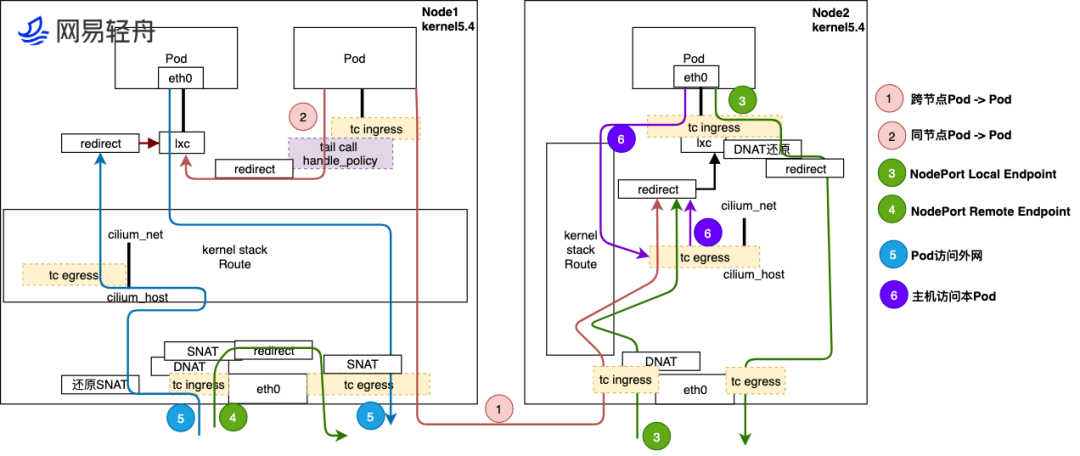
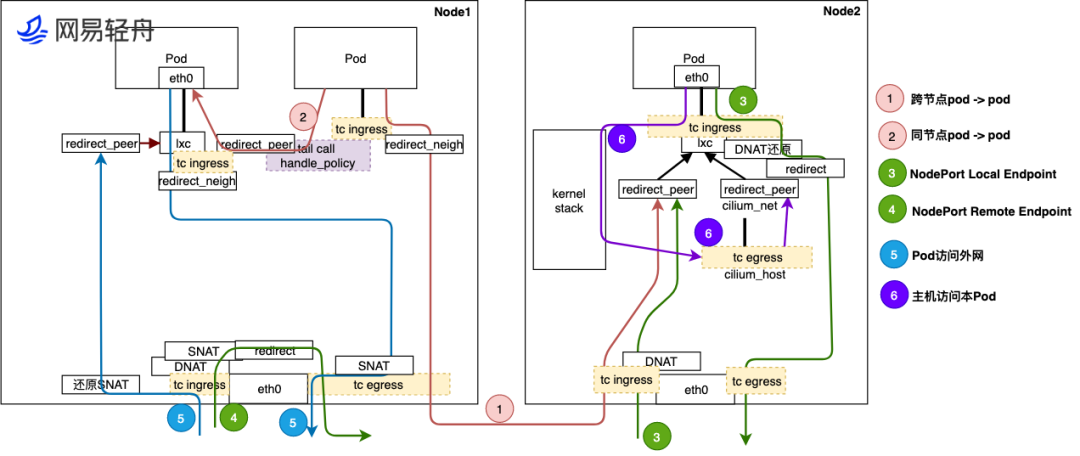
The above figure is cited from https://www.infoq.cn/article/p9vg2g9t49kpvhrckfwu
- Cross-node Pod to Pod Traffic from Pod goes through tc ingress hook on lxc, then sent to kernel protocol stack for route lookup, then sent out via eth0 egress to reach Node2's eth0. After Node2 receives traffic, first processed by eBPF at tc ingress hook of Node2 physical port eth0, then sent to kernel stack for route lookup, sent to cilium_host interface. Traffic passes through tc egress hook of cilium_host, finally redirected to lxc interface of destination Pod's host, and finally sent to destination pod.
- Same-node Pod to Pod Traffic between Pods on the same node can be directly redirected to the target Pod via the tc ingress hook on the lxc interface. This method can bypass the kernel network protocol stack and send data packets to the lxc interface of the target Pod, and then to the target Pod.
- NodePort Local Endpoint Traffic enters from Node2's eth0, processed by DNAT at tc ingress hook, handed to kernel protocol stack routing. Kernel forwards data packet to cilium_host interface. cilium_host's tc egress hook processes and redirects traffic to Pod's lxc interface, then sent to Pod. Return data packet goes through lxc's tc ingress hook for anti-DNAT, redirects traffic to eth0, process bypasses kernel, finally returns to requester via eth0's tc egress hook.
- NodePort Remote Endpoint eth0's tc ingress hook performs DNAT to convert nodeport ip to pod ip, then tc egress hook performs SNAT to change src ip of data packet to node ip and sends traffic.
- Pod accessing external network After Pod sends traffic, processed by lxc's tc ingress hook, sent to kernel protocol stack for route lookup, determining it needs to be sent from eth0. So traffic goes back to physical port eth0, and passed through physical port eth0's tc egress hook for SNAT, converting source address to Node's physical interface IP and Port and sent out. Reverse traffic coming back from external network, passes through Node physical port eth0 tc ingress hook for SNAT restoration, then sends traffic to kernel protocol stack for route check. Flow to cilium_host interface, passes through tc egress eBPF program, directly identified as traffic for Pod, redirects traffic directly to destination Pod's host lxc interface, finally reverse traffic returns to Pod.
- Host accessing this Pod Host accessing Pod traffic sends out using cilium_host port, so at tc egress hook point eBPF program redirects directly to destination Pod's host lxc interface, finally sent to Pod. Reverse traffic, sent from Pod to host interface lxc, passes through tc ingress hook eBPF identification sent to kernel stack, returns to host.
So what are the three chains created by Cilium in iptables used for?
Because in Legacy mode, data packets still need to enter the kernel protocol stack in some cases, so iptables is still needed. FORWARD + POSTROUTING chains are used to send data packets from lxc interface to cilium_host, while INPUT chain is for handling L7 Network Policy Proxy, which will be discussed below.
BPF Host Routing
After 5.10 kernel, Cilium added eBPF Host-Routing function, which further accelerates eBPF data plane performance, adding bpf_redirect_peer and bpf_redirect_neigh two redirect methods.
bpf_redirect_peerCan be understood as an upgrade ofbpf_redirect. It sends data packets directly toeth0interface inside veth pair Pod, without passing through the host'slxcinterface. The benefit of this implementation is that data packets enter the cpu backlog queue one less time. After this feature is introduced, under routing mode, Pod -> Pod performance is close to Node -> Node performance.bpf_redirect_neighUsed to fill src and dst mac addresses of pod egress traffic. Traffic does not need to go through kernel route protocol stack. Processing process:- First looks up routing,
ip_route_output_flow(). - Associates skb with matched route entry (dst entry),
skb_dst_set(). - Then calls to
neighbor subsystem,ip_finish_output2().- Fills neighbor information, i.e.,
src/dst MACaddress. - Preserves
skb->skinformation, so qdisc on physical network card can access this field.
- Fills neighbor information, i.e.,
After introducing this feature, the traffic path has changed significantly.
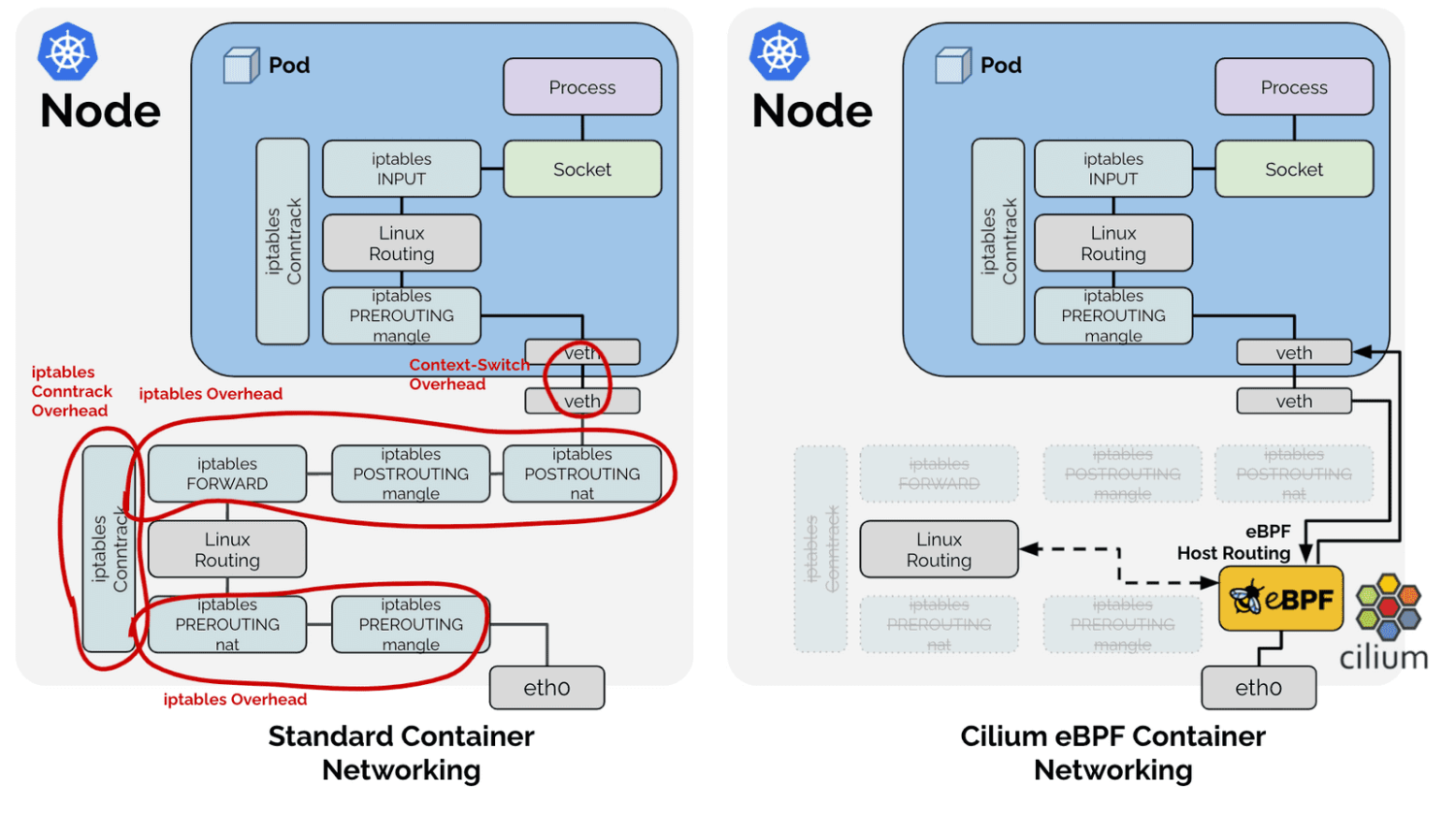
It can be seen that in this scenario, except for local access to local Pods, other traffic will not pass through the kernel protocol stack, on cilium_host and cilium_net.
- Cross-node Pod to Pod
Traffic from Pod passes through
redirect_neighin lxc's tc ingress hook directly via eth0's egress to arrive at Node2's eth0. Node2's eth0 receives traffic, first processed by eBPF at Node2 physical port eth0's tc ingress hook, then sent to Pod2's lxc's tc ingress hook viaredirect_peerto directly send data to Pod2's eth0. - Same-node Pod to Pod Different from Legacy mode, directly sends data packets to destination Pod's eth0 network card.
The following figure will more intuitively represent the simplicity of the data path under BPF Host Routing mode.
Features
Network Policy
Cilium supports Layer 3/4/7 based network policies, and supports both allow and deny modes.
For the same rule, deny has higher priority.
Besides being compatible with Kubernetes NetworkPolicy API, Cilium also provides CRD for defining network policies CiliumNetworkPolicy (for specific fields, please see official documentation, not introduced here).
Cilium provides three network policy modes:
default: Default mode. If anendpointhas aningressset, ingress requests that do not match this rule will be rejected.egressis the same. However, thedenyrule is different. If anendpointonly sets deny, only requests hitting the deny rule will be rejected, others will be allowed. If anendpointdoes not set any rule, its network is not restricted.always: If anendpointdoes not set any rule, it cannot access other services, nor can it be accessed by other services.never: Disable Cilium network policy, all services can access each other or external access.
Layer 3
Labels Based: Select corresponding ip based on Pod labels then filter.Services Based: Select corresponding ip based on Service labels then filter.Entities Based: Cilium has built-in fields to specify specific traffic.host: Local node traffic.remote-node: Endpoints on other nodes in the cluster.cluster: Internal cluster Endpoints.init: Endpoints not yet parsed in the bootstrap phase.health: Endpoint used by Cilium to check cluster status.unmanaged: Endpoints not managed by Cilium.world: All external traffic, allowing world traffic is equivalent to allowing0.0.0.0/0.all: All of the above.IP/CIDR Based: Filter based on IP.DNS Based: Filter based on IPs resolved by dns. Cilium runs dns proxy in agent, then caches dns resolved ip list. If dns name meets allow or deny rules, all requests sent to these ip lists will be filtered.
Layer 4
Port: Filter by port number.Protocol: Filter by protocol, supportsTCP,UDPandANY.
Layer 7
HTTP: Supports filtering by requestPath,Method,Host,Headers.DNS: Different fromDNS Basedfiltering in Layer 3, this is direct filtering of DNS requests (because it is at Layer 7).Kafka: Supports filtering byRole(produce,consume),Topic,ClientID,APIKeyandAPIVersion.
Note: After using Layer 7 Network Policy, all requests will be forwarded to the Proxy in Cilium agent. This Proxy is provided by Envoy. Under Legacy Host Routing mode, the data path will become like this:

The above figure describes the data path when Endpoint to Endpoint uses Layer 7 NetworkPolicy. The upper part is the data path in the default case, and the lower part is the data path after using socket enhancement.
Bandwidth Manager
Cilium also provides bandwidth limiting function.
It can be limited by adding kubernetes.io/ingress-bandwidth: "10M" or kubernetes.io/egress-bandwidth: "10M" in Pod annotation. Thus, the egress and ingress bandwidth of the Pod will be limited to 10Mbit/s.
However, currently this function cannot work with Layer 7 NetworkPolicy at the same time. Using both will cause bandwidth limiting to fail.
Trouble Shooting
This part introduces some tools to facilitate troubleshooting network problems, mainly the use of cilium cli.
You can exec into the cilium pod and use the cilium command line for debugging.
Check cluster network status
cilium status
KVStore:                Ok   Disabled
Kubernetes:             Ok   1.21+ (v1.21.2-eks-0389ca3) [linux/amd64]
Kubernetes APIs:        ["cilium/v2::CiliumClusterwideNetworkPolicy", "cilium/v2::CiliumEndpoint", "cilium/v2::CiliumNetworkPolicy", "cilium/v2::CiliumNode", "core/v1::Namespace", "core/v1::Node", "core/v1::Pods", "core/v1::Service", "discovery/v1::EndpointSlice", "networking.k8s.io/v1::NetworkPolicy"]
KubeProxyReplacement:   Disabled
Cilium:                 Ok   1.10.3 (v1.10.3-4145278)
NodeMonitor:            Listening for events on 8 CPUs with 64x4096 of shared memory
Cilium health daemon:   Ok
IPAM:                   IPv4: 1/254 allocated from 10.0.1.0/24,
BandwidthManager:       Disabled
Host Routing:           Legacy
Masquerading:           Disabled
Controller Status:      30/30 healthy
Proxy Status:           OK, ip 10.0.1.118, 0 redirects active on ports 10000-20000
Hubble:                 Ok   Current/Max Flows: 4095/4095 (100.00%), Flows/s: 12.47   Metrics: Ok
Encryption:             Disabled
Cluster health:         5/5 reachable   (2021-10-18T15:01:07Z)
Packet Capture
cilium monitor
In BPF scenarios, because the data path has changed significantly compared to the traditional network stack, using tools like tcpdump for packet capture debugging can cause some problems if you are not familiar with this mode. (For example, under BPF Host Routing, the lxc interface cannot capture return packets).
Fortunately, cilium provides a set of tools for analyzing data packets to facilitate developers in troubleshooting.
NetworkPolicy Tracing
If many network policies are used in the cluster, it may cause requests to hit unexpected NetworkPolicies and fail in some cases.
Cilium also provides policy tracing function to trace requests hitting NetworkPolicy.
cilium policy trace
# Verify which cnp will be hit by traffic from xwing under default ns to port 80 of endpoint with deathstar label under default ns
$ cilium policy trace --src-k8s-pod default:xwing -d any:class=deathstar,k8s:org=expire,k8s:io.kubernetes.pod.namespace=default --dport 80
level=info msg="Waiting for k8s api-server to be ready..." subsys=k8s
level=info msg="Connected to k8s api-server" ipAddr="https://10.96.0.1:443" subsys=k8s
----------------------------------------------------------------
Tracing From: [k8s:class=xwing, k8s:io.cilium.k8s.policy.serviceaccount=default, k8s:io.kubernetes.pod.namespace=default, k8s:org=alliance] => To: [any:class=deathstar, k8s:org=empire, k8s:io.kubernetes.pod.namespace=default] Ports: [80/ANY]

Resolving ingress policy for [any:class=deathstar k8s:org=empire k8s:io.kubernetes.pod.namespace=default]
* Rule {"matchLabels":{"any:class":"deathstar","any:org":"empire","k8s:io.kubernetes.pod.namespace":"default"}}: selected
    Allows from labels {"matchLabels":{"any:org":"empire","k8s:io.kubernetes.pod.namespace":"default"}}
      Labels [k8s:class=xwing k8s:io.cilium.k8s.policy.serviceaccount=default k8s:io.kubernetes.pod.namespace=default k8s:org=alliance] not found
1/1 rules selected
Found no allow rule
Ingress verdict: denied

Final verdict: DENIED
Dns Based NetworkPolicy Debug
As DNS query results change, FQDN Policy interception results also change, making this part difficult to debug.
You can use cilium fqdn cache list to check which dns-ips are cached in the current dns proxy.
If traffic is allowed, then these IPs should exist in local identities, cilium identity list | grep <IP> should return results.
Hubble
Cilium also provides Hubble to strengthen network monitoring and alerting. Hubble provides the following functions:
- Visualization
- Service call relationships
- Supports HTTP, kafka protocols
- Monitoring and Alerting
- Network monitoring
- Whether there was a network communication failure in the past period of time, reason for communication failure
- Application monitoring
- Frequency of
4xxand5xxHTTP Response codes, which services they appear in - HTTP call
latency
- Security monitoring
- Whether there are requests failed due to NetworkPolicy Deny
- Which services have received requests from outside the cluster
- Which services request to resolve a specific dns